
- AI Image GeneratorAI Character
- AI Video Generator
- AI Image ToolsAI Video ToolsOther Tools
 AI Image Generator
 AI Character
 AI Art
 AI Video Generator
 Other Tools
- AI Image Generator
- AI Art
- AI Video Generator
- AI Video Effects
- AI Image Tools
- AI Video Tools
- Other Tools
- Start Now
7 Best AI Coloring Page Generators in 2026 for Kids and Adults (Compared and Reviewed)
 SprakinsLast Updated: 2026/11/12
Have you ever used an AI coloring page generator in your daily life? A coloring page used to be something you bought from a supermarket; it could be time-consuming. In 2026, with an AI coloring page generator, the same things only take seconds: prepare a sketch, pick a style, and a clean black-and-white outline is generated.
However, choosing the best AI coloring page generator can be hard, because half the tools don't actually draw anything; they just recolor an image you already have.
So, here's the question worth answering. If you have one evening to prepare, which of these 7 tools in this article actually gets you to a coloring page? We opened each one, ran it against the same brief, and compared the output from adults and a child's view.
What Is an AI Coloring Page Generator?
Different from a regular text-to-image model, an AI coloring page generator is designed to create black outlines on a white background and to color existing black-and-white pages. It focuses more on closed shapes than a typical text-to-image model.
Why Use an AI Coloring Page Generator?
Most people search for an AI coloring page generator to save time. Besides, there are also some other reasons:
Create Personalized Coloring Pages
These tools will be useful when used for personal projects. For example, a parent might upload a photo of the family dog to make a coloring sheet for their child. A teacher could turn a class photo into a group activity. An architect fixing their house might use a drawing of the outside walls in a generator. AI coloring pages can be smartly used in many personalized industries.
Create Original Line Art
Many AI coloring page generators work without a source image. You just describe a scene in a prompt box, and the model creates the drawing; then you can gain a totally original work. This is the key difference between a tool that converts and creates. For line art, having your own original work is more important than copying others.
Create Coloring Materials for Commercial Projects
Check if the generated coloring page can be used commercially. For example, if you publish coloring books and sell them on Etsy, it needs to be committed by its creator. Now, AI coloring page generators can help you avoid most content that breaks copyright rules, and the created content is usually good enough to sell.
What Can You Create with an AI Coloring Page Generator?
Capability is easier to judge by who will use it than by its features. Different groups use the same model but require very different things.
Coloring Pages for Kids
Coloring pages made for children are basically learning tools. Teachers use them to help kids recognize letters and numbers, learn words about animals and where they live, and improve hand skills through coloring or writing. This means AI coloring page generators for kids need to be a lower-standard with line thickness, clear images, and handling background colors.
Detailed Coloring Pages for Adults
Coloring pages made for adults need to meet much higher technical standards. No matter if the design shows plants, buildings, or animals, the final look depends a lot on how dense and well-spaced the lines are. This ability is something that AI-generated coloring pages for kids can’t achieve.
That’s why professional tools are so useful here. They let you work with higher resolutions and offer more options for exporting.
7 Best AI Coloring Page Generators in 2026
Based on the uses and reasons mentioned above, here are 7 best AI coloring page generators, with a detailed look at each.
1. CharaLab — Best AI Coloring Page Generator for AI character
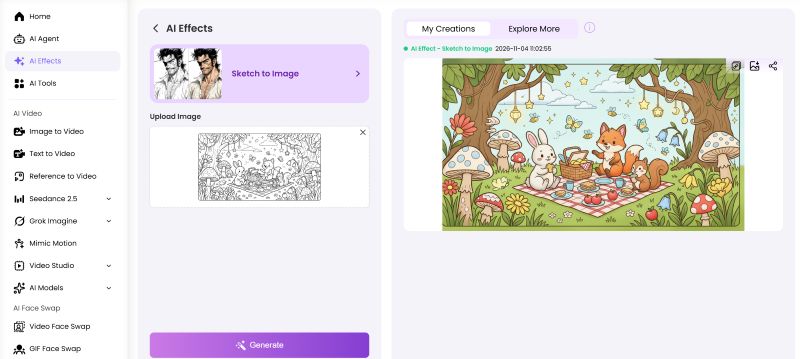
CharaLab is the best AI coloring page generator for AI characters. The main feature of this platform is image-to-character. You just upload a sketch, pick a style, and add a short prompt. The model then creates a fully colored, finished piece.
With its Photo to Sketch feature, you can add color to a blank image; this means you can create a colored character from a rough draft. And its AI Manga Generator also works with manga-style layouts, letting artists create comics from 1 to 6 frames without any painting skills. The creative process is simple and easy for everyone, whether you are a child or an adult.
Key Features
- Sketch-to-Image Transformation: Upload ink line art as a reference image and receive a fully colored page illustration
- More than 20 Art Styles: Across the character generator, including anime, chibi, Ghibli, comic, 3D cartoon, pixel art, and fantasy, and so on
- Line-Art Generation: Photo-to-sketch helps you convert a photograph into a blank outline
- AI Manga Generator: Whether black-and-white or full-color manga, aimed at turning drawn stories into colorized strips at 1:1, 9:16, or 16:9
- A Full Toolset: Massive built-in AI tools can clean up the generated coloring page
Advantages
- The workflow needs zero drawing ability, fit for kids and adults
- Line art and color live in one place
- Keep coloring page consistency
- End-to-end coloring page workflow
Disadvantages
- No PDF output
- AI character generation first
Best For
- Webcomic artists
- Parents and primary teachers
- Self-publishing authors
- Hobbyist colorists
Pricing
- Free daily credits
- Pay-as-you-go for paid credits
- No mandatory subscription
2. Adobe — Best AI Coloring Page Generator for Pictures
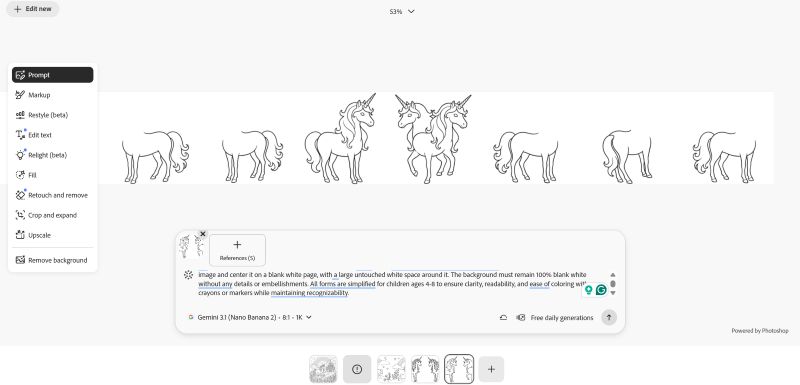
Adobe's coloring page generator is for pictures. When you start a picture project in Adobe, you can use JPG, PNG, and WEBP files. The file size can be up to 100 MB and the image must be at least 512 × 512 pixels. Then, you can add effects like line art, ink-wash styles, or sketches to your generated picture.
You can also refine your picture further. For example, import it directly into Adobe Express to add titles or borders, or even combine several images into a PDF file. In addition, the model is trained on licensed data and follows clear usage guidelines; the pictures you create are ready for commercial use.
Key Features
- Picture-to-Line-Art: Pictures cover animals, characters, holiday scenes, and architectural subjects
- Sketch Effects: Push the model toward printable outlines instead of shaded renders
- Photoshop on the Web: For your coloring page's post-processing
- Commercial Use: With published generative AI guidelines for publishing the results
Advantages
- Well-known tool
- Adobe ecosystem
- Licensing is documented
Disadvantages
- Coloring pages are a side feature
- The tool is fragile in practice
- Credits can be costly
- Not fit for children
Best For
- Illustration freelancers
- Self-publishing authors
- Design studios
- Art directors
- Adults
Pricing
- Free daily generations on a free account
- Firefly standard: $9.99/mo
- Firefly pro: $19.99/mo
- Firefly pro plus: $49.99/mo
- Firefly premium: $199.99/mo
3. iColoring AI — Best AI Coloring Page Generator for Kids
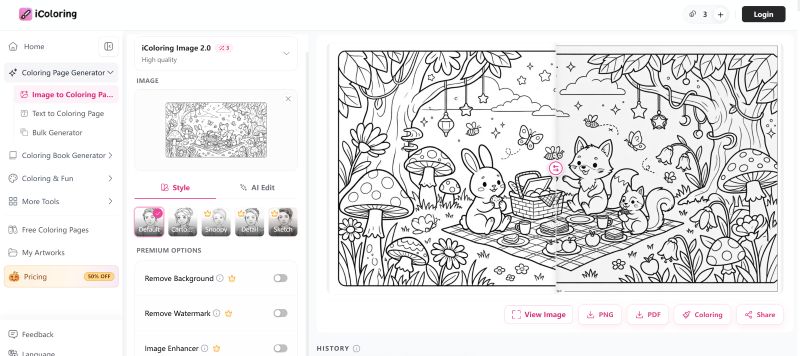
iColoring AI is made especially for kids; it offers a large library of coloring pages. The platform also includes a built-in set of child-friendly ideas to help kids choose what to draw, whether in a classic, cartoon, or pencil-sketch style, to help them grow their artistic skills.
Additionally, the platform meets the practical needs of kids’ learning by allowing the creation of many materials at once for classroom use and by offering 825 free, printable resources in PNG and PDF formats.
Key Features
- Coloring Page for Kids: With Classic, Cartoon, and some other styles for children
- Built-in Prompt Library: A parent can start from a built-in prompt idea
- AI Colorizer: Input an existing coloring page; it returns a fully colored reference image
- Bulk Generator: A whole production workflow in one service rather than page by page
- Free Printable Pages: You can export free printable pages for your own needs
Advantages
- No sign-up
- Low learning curve
- Kids-friendly
Disadvantages
- It is extremely vertical for kids
- The control set is basic
Best For
- Kindergarten
- Primary school teachers
- Parents of children aged 4 to 8
Pricing
- Free tier
- Starter plan: $7.99/mo
- Hobby plan: $9.99/mo
- Artists plan: $7.99/mo
- Business plan: $49.99/mo
4. Colorify AI — Best AI Coloring Page Generator for Photos
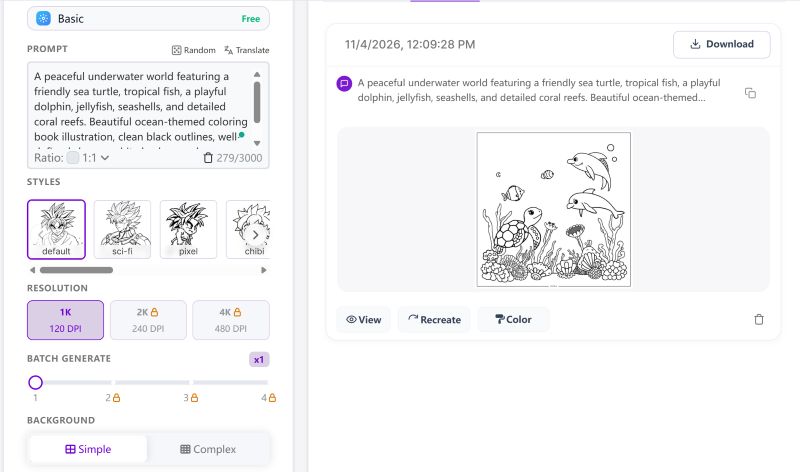
Colorify AI treats photos as its main feature. Among the 7 tools, its photo mode is the most advanced; instead of just turning a photo into simple shapes, users can provide detailed prompts, and the tool changes them into high-quality coloring photos.
When processing photos, Colorify AI offers a slider that lets you see the photo's line thickness and detail before using any credits, which helps avoid wasting time and energy. You can use this feature on a tablet or computer.
Key Features
- Photo-to-Coloring Conversion: With 4 line-art styles and a live slider for adjusting detail before generation
- Art Styles: Including chibi, anime, pixel, graffiti, and clay, all rendered as outlines
- Resolution Control: From 1K to 4K with a choice between simple and complex backgrounds
- Batch Generation: At a time, generate many outputs, plus a coloring book generator for assembling a set
- Adjusted Tools: Some AI tools can be useful in processing your coloring page
Advantages
- The photo style range is broad
- Sign-up free
- The online colorizer offers a paperless option
Disadvantages
- Free output can be vague
- The product is entertainment-first
- Not suitable for professional work
Best For
- Art students
- Tablet-based hobbyists
- Primary school student
Pricing
- Basic plan: $9.9/mo
- Plus plan: $29.9/mo
- Pro plan: $69.9/mo
5. MyColoring AI — Best AI Coloring Page Generator for Printable Book
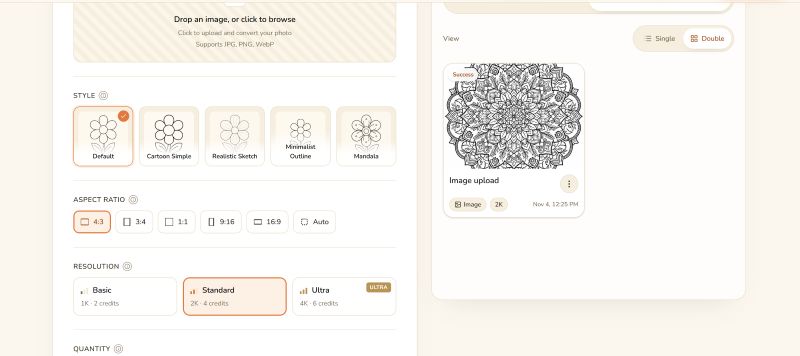
MyColoring AI is the best AI coloring page generator for printing books. To make a personalized coloring book, it can turn a photo or a short description into a cartoon character, write a story idea with their name in it, and let an AI coloring book creator draw every page with that same character for their books.
With MyColoring AI, a 10-page book plus a colorful cover takes only a few minutes to set up and seconds to create; creators can download it as a PDF to print at home or at a print shop.
Key Features
- Three Modes for Printable Book: photo, text, and name; you can print them one by one through your creation step
- Line-thickness Controls: With Mandala and Realistic Sketch options for adult-oriented pages
- Print-first Export: Export in A4 or US Letter as PDF or PNG, downloadable without a watermark
- Shared Coloring Features: Live rooms for up to 8 people, plus a prompt gallery that reuses settings from published pages
Advantages
- It covers the widest spread of use cases
- Free credits work without an account
Disadvantages
- The interface is dated
- Commercial use is limited
- Side features can be messy
Best For
- Etsy sellers
- Preschool teachers
- Event planners
- Pet owners and families
Pricing
- Free tier with 4 credits
- For starter: $11.99/mo
- For standard: $19.99/mo
- For business: $66.99/mo
- Premium plan: $34.99/mo
6. GenColor AI — Best AI Coloring Page Generator for Line Art
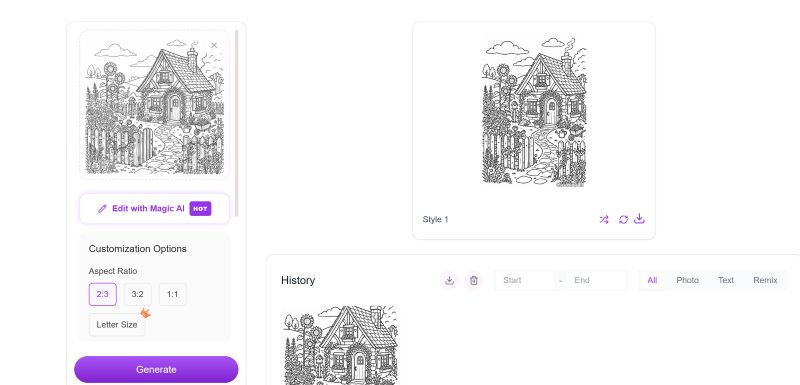
GenColor AI is the best AI coloring generator for line art. Using its advanced AI, you can make custom line art coloring pages by just describing what you want or uploading a picture. The tool quickly turns your input into a clear line art page that you can keep for yourself. After this, it can be convenient to change the line art's styles, details, and subjects in its line art generator.
Each time you generate line art, you will get two versions; this provides a backup in case one is damaged. This feature helps parents who want to preserve memories for their children's growth.
Key Features
- Generates Original Line Art: Create line art from a description, covering scenes, characters, and objects without a source image
- Key-point Line Art Detail: Preserving line art proportions and details when converting portraits
- Two Variations Per Generation: Letting you choose between two interpretations instead of accepting the first result
- Privacy Protection: Uploaded photos and half-finished pages stay out of any public gallery
Advantages
- The workflow is complete end-to-end
- Lower pricing plan
Disadvantages
- There is no real free plan
- You cannot see what a preset looks like before spending a generation
- Not friendly to new users
Best For
- Portrait artists
- Parents
- Art therapists
- Illustrators
Pricing
- Basic plan: $5.94/mo
- Plus plan: $11.94/mo
- Studio plan: $29.94/mo
- Enterprise plan: $59.94/mo
7. BookCoversLab — Best AI Coloring Page Generator for Book Covers
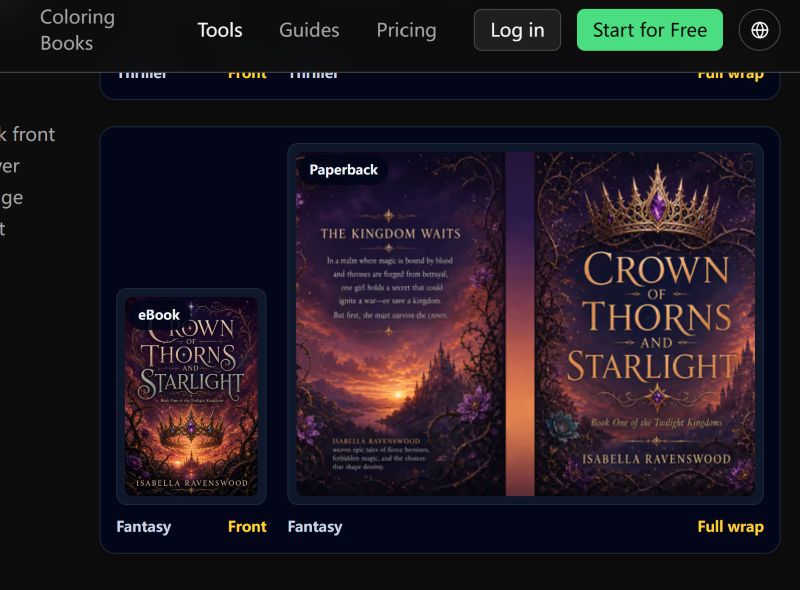
BookCoversLab takes a publishing-focused approach to design book covers. The generator offers just three options: a prompt, book cover size, and a generate button. There’s no style library, image upload, or settings menu; you enter your idea, pick a size, and get a single book cover in PNG format in about 20 to 60 seconds.
In BookCoversLab, each prompt automatically adds balanced color for a book cover, and the pixel dimensions also match the book files, so you can add the PNG to a KDP workflow without resizing.
Key Features
- Book Covers Oriented: Its main function is to support creating book covers with AI
- KDP-matched Sizes: Here are the common KDP book sizes and their required image dimensions in pixels
- An Automatic Lock: Make sure to use closed outlines, white backgrounds, and avoid shading or extra text
- GPT Image 2.5 Generation: Generate book covers in seconds, and one AI credit for each additional page
- Assets into Publishing: Its coloring book generator, formatting tool, and cover maker can turn into a real book
Advantages
- Nothing to decide except the subject.
- The site states what it does not do
- A working publishing pipeline sits behind it
Disadvantages
- Only a single page
- The interface is bare
- The entry price is the highest
Best For
- KDP self-publishers
- Teachers and librarians
- Etsy printable sellers
- Authors already inside a book workflow
Pricing
For Cover Wrap:
- AI Print: $19.99/mo
- AI Print pro: $39.99/mo
- AI Author Suite: $59.99/mo
- AI Marketing Suite: $89.99/mo
For AI Covers:
- Sprint Credits: $9.99/mo
- Launch Credits: $9.99/mo
- Studio Credits: $9.99/mo
For Coloring:
- Starter: $7.9/mo
- Growth: $23.9/mo
- Pro: $39.9/mo
7 Best AI Coloring Page Generators Compared
This table mainly compares information for different target groups, such as adults and kids.
| Generator | Line Art | Kids | Adults | End-to-End Workflow |
| CharaLab | Yes | √ | √ | Yes |
| Adobe | Yes | × | √ | Yes |
| iColoring AI | Yes | √ | × | No |
| Colorify AI | Yes | √ | × | No |
| Mycoloring AI | Yes | √ | √ | No |
| GenColor AI | Yes | × | √ | Yes |
| BookcoversLab | No | × | √ | No |
Of all the tools above, you can see from the product screenshot that only Bookcovers Lab doesn't let you create line art. The others do have this feature. In addition, CharaLab and Mycoloring AI are both good fits for kids and adults.
How to Choose the Best AI Coloring Page Generator?
After comparing features, let's talk about how to choose the best AI coloring page generator:
Who Is It For
Age is the biggest factor in choosing an AI coloring page generator:
- For a four-year-old kid, CharaLab's photo-to-anime and Colorify AI's character styles create pages with big, easy shapes.
- For adults, Adobe's effects panel and GenColor AI keep the line detail needed for botanical and mandala pages
In many cases, you need to consider the user's age to select a suitable AI coloring page generator.
Free or Paid Option
How much you're willing to pay clearly separates hobbyist tools from professional ones. If you only need several coloring pages each month, CharaLab's pay-as-you-go plan gives you 4k output without a watermark; iColoring AI lets you print for free without signing up. MyColoring AI gives you four credits before asking for your email.
If you need to use these tools regularly, the costs change. GenColor AI offers the smallest free plan but has the lowest paid option at $5.94 per month with annual billing, which works well for someone making one book a year.
Download App or Web-Based
All listed tools work in a browser and don’t need to be installed, so the main difference is how well they work on small screens. For teachers printing in a classroom, a browser tab is easier than an app. For parents giving a tablet to a child, the touch-friendly tools are best.
4 Steps to Create a Stunning Coloring Page with AI
Once the tool is ready, here are 4 steps to create a stunning coloring page, taking CharaLab as an example .
Step 1: Choose a Subject for Your Coloring Page
Choose one clear subject instead of a whole scene. For example, a single animal, a face, a building, or a letter shape gives the model a clear outline to follow.
If the page is for a child, include their age in the prompt. If it’s for a book, make sure the subject matches the rest of the series so everything feels consistent.
Step 2: Write a Detailed AI Prompt
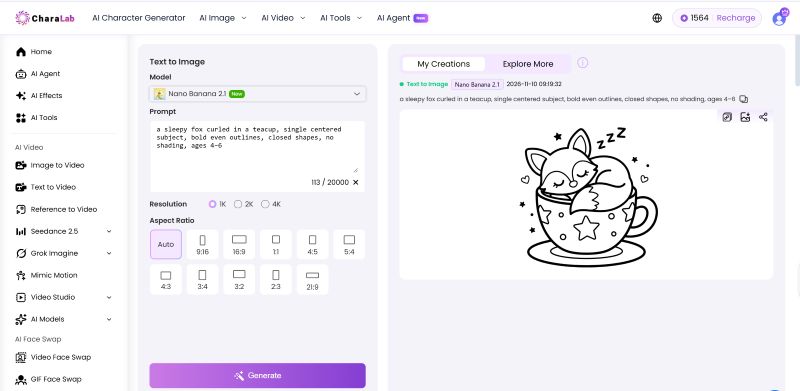
Most disappointing coloring pages come from unclear prompts. A good prompt includes four details: the subject, how it’s framed, the style of the lines, and who it’s for. For example, "a sleepy fox curled in a teacup, single centered subject, bold even outlines, closed shapes, no shading, ages 4–6" works much better than just "cute fox" because it stops the model from adding extra details.
The image below shows the output generated by CharaLab.
Step 3: Generate and Review the Image
After you generate a page, check three things before trying again:
- Are the outlines closed?
- Is the line weight consistent?
- Is the page simple enough for a child to finish?
It’s usually easier and cheaper to regenerate right away than to fix a bad page later. Tools that offer variations, like CharaLab's manga generator, can speed up your second try.
Step 4: Download and Print Your Coloring Page
Download the highest resolution your generator allows and check the file before printing. A 1K PNG will look blurry on A4 paper, but 2K or higher will print clearly. Exporting as a PDF usually keeps the scale better than resizing a JPEG.
Tips for Generating Better Coloring Pages with AI
A few habits prevent the mistakes that show up most often in AI coloring pages.
Use Clean Black-and-White Outlines
Always use pure black lines on a pure white background, without any gray fill or shading gradients. Shading is the main reason a generated page fails in print, since a child's marker can't cover gray areas well.
If your tool has a line-art effect, use this instead of relying only on your prompt.
Match the Complexity to Your Audience
Complexity is the most important setting to adjust. For kids, use fewer shapes, focus on large areas with one main subject, and keep details to simple outlines instead of patterns. However, for adults and designers, more details are better.
Keep Your Designs Updated
Seasonal demand comes up faster than you might think, and coloring pages are meant to be used and replaced. Halloween sets should be ready by early September, Christmas sets by late October... This schedule makes tools with batch generation and saved settings very helpful, because making new pages for each season is not realistic.
FAQ
Is There a Free AI Coloring Page Generator Online?
Yes, and some options are truly free, not just free trials. CharaLab offers free daily credits that let you download HD files, and BookCoversLab gives you one free preview PNG after you log in. Colorify AI is also free, but it adds a watermark to your images. That’s okay if you just want to keep it for yourself, but not if you plan to sell or list it.
Can AI Generate Coloring Pages from Text Prompts?
All 7 tools can export print-ready text prompts, but the maximum quality varies. Also, make sure you have the right usage permissions before selling your work.
Can AI-Generated Coloring Pages Be Printed?
Sure, the 7 generators can export print-ready files. Adobe lets you export high-resolution files and create a multi-page PDF in Express. MyColoring AI exports directly to A4 and US Letter sizes. Before printing at A4 size, check the resolution; anything at 1K will look blurry.
What Is the Best AI Coloring Page Generator for Kids?
CharaLab and iColoring AI are best for kids. They feature simple learning curves and offer free credits for trial use, perfect for children to explore coloring pages, with a parent by their side.
What Prompt Should I Use to Generate a Coloring Page?
Describe the subject, framing, line style, and age group in one sentence, then add what you don’t want. Here’s a template: a [subject] + [pose or setting], single centered subject, bold even black outlines, closed shapes, no shading, no text, ages [range]. For adult pages, only add a style word like mandala, botanical, or cartoon if you really want that look.
Conclusion
Each of the seven tools is designed for a specific job.
- If you’re a parent who needs a printable page tonight, iColoring AI and Colorify AI make it simple by handling the choices for you.
- If you're a teacher who wants to solve difficulties for your students. MyColoring AI’s controls are especially useful.
- If you're a seller who needs clear commercial licensing and massive production, you can rely on GenColor AI’s studio plan
- If you're a KDP author, you can use BookCoversLab’s trim-matched PNG to skip the resizing step, which often reduces line quality.
- If you're an illustrators who prefer more control over art direction instead of using templates, you can treat Adobe Firefly as the best option.
- If you are looking for an all-in-one platform, CharaLab is designed for character generation. With over 20 character styles and manga creation, it’s a practical starting point for anyone who begins coloring with their own drawing.
All these tools share a common limitation: the gap between sketching and coloring. Most of them can either create an outline or color one, but only CharaLab can turn a hand-drawn sketch into a finished character.
 10 Best 3D Character Creator Tools in 2026(Reviewed & Ranked) >>Which is the best 3D character creator in 2026? Simply follow the comparison of 10 tools based on features and pros/cons, to find the right tool for your work. >>
 8 Best OC Generator for Consistent AI Characters (2026) >>Are you searching for the best OC generator? This guide compares the 8 best OC generators, which will help you choose the right one for your consistent OCs. >>
 6 Best DnD Character Creators from a Beginner's Perspective >>Looking for the best dnd character creator in 2026? This guide lists the 6 best creators for new users in DnD. >>
 8 Best AI Pet Portrait Generators for Pet Owners in 2026 >>Searching for the best AI pet portrait generator for your cute pet? Simply follow this guide to choose a dedicated pet portrait generator. >>
 7 Best Graffiti Generators for Creative Works in 2026 (Tested and Ranked) >>Discover the 7 best graffiti generators in 2026 to create graffiti art, logos, fonts, and tags. Compare tools and find the right one for your creative needs. >>
 Mascot Generator: How to Create Your Own Mascot with AI in 2026 >>Learn what a mascot generator can do, explore popular mascot styles, and discover how to create your own custom AI mascot with CharaLab in 2026. >>
 7 Best AI Outfit Generators in 2026 for Virtual Styling >>Looking for the best outfit generator? Explore the 7 best outfit generators in 2026 for virtual styling and fashion ideas to dress you up. >>
He is an experienced expert in AI character creation and has led the early design of many virtual character products. His step-by-step guides help creators build the AI character online from scratch. Here, he turns complex character prompts into different character styles, helping every human-machine collaboration get closer to the perfect character you imagine.