
- AI Image GeneratorAI Character
- AI Video Generator
- AI Image ToolsAI Video ToolsAI Face SwapOther Tools
 AI Image Generator
 AI Character
 AI Art
 AI Video Generator
 Other Tools
- AI Image Generator
- AI Art
- AI Video Generator
- AI Video Effects
- AI Image Tools
- AI Video Tools
- Other Tools
- Start Now

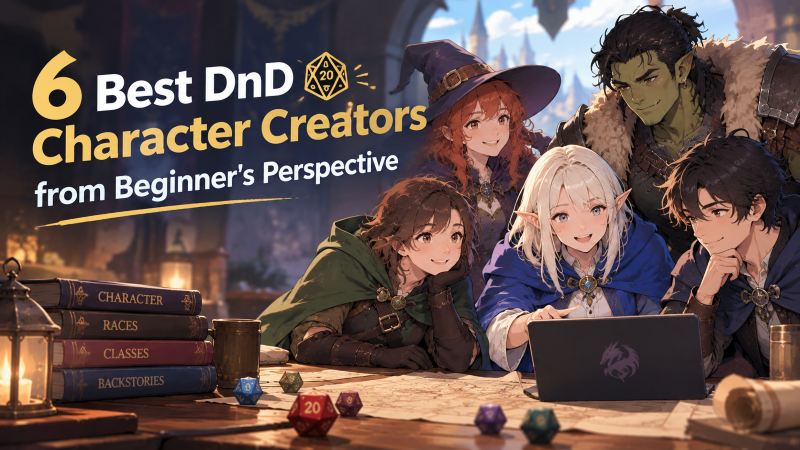
6 Best DnD Character Creators from a Beginner's Perspective
 SprakinsLast Updated: 2026/09/30
Are you looking for a DnD character creator that won’t make your first dnd character a mess? As we all know, making a D&D character should be fun, but most beginners complain about high costs, versions that don’t match their characters, limited character styles, and more. These issues can be hard to fix manually, so sometimes you need a tool to help.
In this guide, we compare the 6 best DnD character creators for 2026. Whether you are new to DnD, a Dungeon Master preparing NPCs, or part of an online group, you will find the best DnD character creator here to suit your workflow and budget.
What is a DnD Character Creator?
A D&D character creator is any tool that helps turn your character idea into something you can actually use in a game. This process has two main parts, and it helps to think about them separately before you spend any money.
The first part is the character sheet. This includes things like species, class, background, ability scores, skills, equipment, spells, hit points, and armor class.
The second part is the character’s appearance, like their face, silhouette, and overall look. Most free builders leave this part out.
Why DND Character Creation Still Feels Hard?
Rolling a character isn’t actually hard. The real challenge in 2026 is that you still have to use different tools and probably buy a couple of books to begin. That’s what really slows things down.
1. High Character Production Costs
If you want unlimited character sheets or table tools, you'll need to pay for subscriptions too. Getting a custom portrait instead of the default grey silhouette can cost more than all your rulebooks combined. For a hobby you're just testing out, that's a lot to spend before your first session.
2. Outdated Game Version
This is the quiet one. D&D updated its core rules in 2024, changing how species, backgrounds, and ability score increases work. Many free tools still use the 2014 ruleset. While these tools still function, your finished character might not fit the table you're joining.
Before choosing a D&D character builder, check which version it uses. Often, if a tool is free and popular, it is based on the 2014 rules and may feel outdated.
3. Limited Character Visual Styles
Newcomers to D&D often have a clear idea of the character they want to play, maybe a mysterious elven wizard or a tough dwarven warrior. But if a character creator offers only a few fixed styles, these unique characters end up looking the same.
A better tool acts like a big AI asset library, offering plenty of ways to change how things look. This makes it easier and faster for anyone to create a unique D&D character that feels personal, instead of relying on limited templates.
4. Lengthy Character Creation Workflow
The usual beginner workflow is honestly slow. You read the rules in one tab, fill out the sheet in a PDF in another, look up spells in a third, open a dice app, and search for art somewhere else. Each time you switch tabs, you risk losing your place or your patience. Most of the challenge in character creation isn't really the rules; it's the workflow.
6 Best DnD Character Creator You Can Actually Try
Here, we compared and ranked them by DnD character character, free tier, pricing, and how easy each one is to use from the start. None of the six are bad. They are just made for different people.
1. CharaLab - Best Dnd Character Creator for Art Character
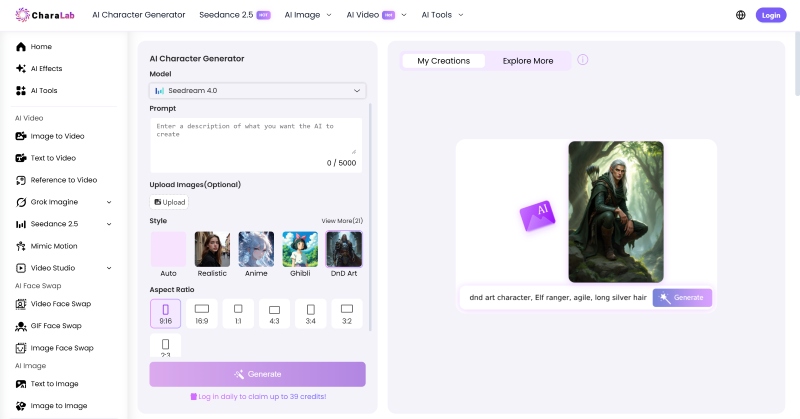
CharaLab is a DnD character creator that decides what your character's art styles. Just describe your species, class, and gear, integrate them in one sentence, and you’ll get a high-quality DnD character portrait in seconds.
CharaLab understands regular language so that you can use DnD terms in your prompts, and it will recognize them. Just describe your DnD character's features, and the generator will create a character based on them.
If you already have a prompt, you can upload a sketch, a moodboard, existing character art, or even a photo of yourself, and CharaLab will turn it into a DnD character in the style you choose.
Key Features
- Prompts Written in D&D Terms: Describe your DnD character's species, class, subclass, armor, weapon in the prompt box
- Campaign-long Consistency: Reuse one approved DnD character across different scenarios
- DnD Character to Life: Turn a finished DnD character into a short clip for a character reveal or a campaign teaser, plus a large library of video effects templates
- AI Toolkit: Adjust the DnD character's other details, including background, outfit
- Character Effects: Enrich your D&D character's performance in different scenarios
Pros
- The fastest way to give a new DnD character
- No drawing skills required
- Styles cover the whole spread of DnD campaign
- Usable in any campaign, not just on day one
- Free to start, and free output carries no watermark
Cons
- CharaLab won't roll ability scores or print a legal 5e sheet
- Too much character styles
Pricing Plan
- Free credits are available for news
- Pay-as-you-go
Who is it Best for
- Players who have built the sheet
- Groups who want party art
- Dungeon Masters illustrating NPCs
- Actual-play streamers who need a consistent face across episodes
2. D&D Beyond - Best DnD Character Creator for Free Character Sheets
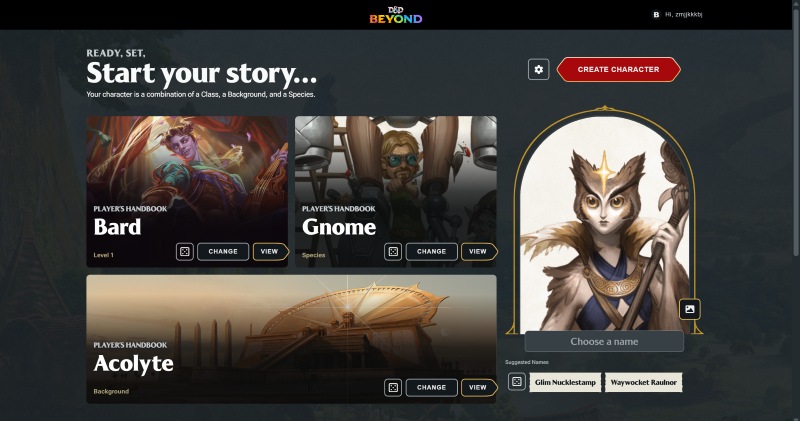
D&D Beyond is the official digital tool set for free character sheet, and it’s usually the first place beginners go. With a free account, you get access to the full character builder, six character slots, and a live character sheet that updates as you level up.
The creator guides you step by step through species, class, background, and ability scores, using clear explanations for each choice. This is exactly what new palyers need.
Key Features
- Guided DnD Character Sheet: Choose from validated options, and watch your character sheet update
- Free Account: Sign up for a free account to get up to six character slots
- Official Mobile and Tablet Apps: Use our official apps to play on your phone or tablet
- Campaign Tools: Organize players, keep track of rolls, and share content easily with campaign tools
- Marketplace: Browse the marketplace for official and partner books
Pros
- Free and official, the character sheet is really complete
- The character builder explains each step instead of assuming you know
- Keep your sheet, campaign, and VTT together in one account
- Enormous community to support your experiences
Cons
- To have unlimited slots, you need the Hero plan
- Most races and species must be purchased one book at a time
- Portraits come from uploads and stock frames, not computer-made art. For a custom look, you will need to go somewhere else
- Digital books are sold separately from physical ones
Pricing Plan
- Free tier: Play at no cost
- Hero tier: $2.17/mo
- Master tier: $4.58/mo
Who is it Best for
- First-time players
- Board gamers
- Phone or tablet users
3. CharGen - Best DnD Character Creator for Fantasy Character
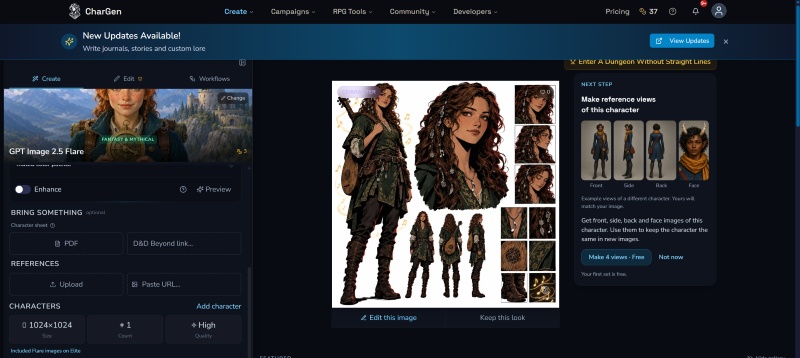
CharGen sits deliberately between art and creation, and it's built for fantasy tables rather than general image generation. You can upload a character-sheet PDF, paste a D&D Beyond link, or photograph your hand-written sheet, and CharGen reads the race and species, then paints a portrait that matches the character on the page.
Key Features
- DnD Character Sheet to Fantasy: Turn a DnD character sheet PDF, reference or photo into a matching portrait
- Unlimited Free Text Generators: Including NPCs, quests, classes, worlds, encounters, items, settlements, factions and so on
- 160+ AI Image Models: Multiple image models to support your DnD character creation
- Character Reference: Pin one look and keep it consistent across a campaign
Pros
- Reads the sheet you already have
- Art, tokens, and sheet export all in one place
- Token Maker is always free and does not require login
- Covers both the 2014 and 2024 rules
Cons
- It is not a full rules engine
- Creating a DnD character video can be costed
- Pricing is in GBP
Pricing Plan
For membership:
- Get started for free
- Plus plan: £8 per month
- For power users: £16 per month
- For professional creators: £32 per month
For gold packs:
- Starter pack costs £5.99 per month (300 gold/month)
- Popular choice is £14.99 per month (900 gold/month)
- Best value plan is £29.99 per month(2000 gold/month)
- For big studio, £59.99 per month (4500 gold/month) is more suitable
Who is it Best for
- Groups that want a 5e-approved character sheet
- Players who already have a character sheet
- Groups playing on Foundry
- Dungeon Masters creating many NPCs
4. Roll20 - Best DnD Character Creator for Virtual Tabletop
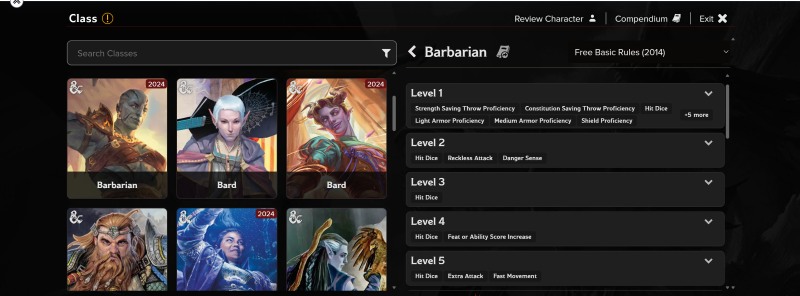
Roll20 is the largest browser-based virtual tabletop, and character creation is one part of a much bigger machine. You open a game, choose your system from 1,200+ supported rulesets, and build your D&D character directly on the sheet.
The built-in charactermancer guides you through choosing your character's species, class, background, and equipment, then keeps the character sheet updated. You don't need to save or export anything: your character is ready to play as soon as you finish creating it.
Key Features
- Multiple Character Versions: Live character sheets for over 250 games, including D&D 5e
- Exploring Character Capability: Show the character map as players explore
- Free Map Creation: Free maps are available in your DnD world
- Community Features: A board to find groups, forums, and a Discord with over 100,000 members
Pros
- Build and play in the same place
- The free tier is strong enough to run a full campaign at no cost
- Enormous content library and the largest player community
- Much easier to learn than self-hosted tabletops
Cons
- The interface shows its age, and heavy maps can feel slow
- Roll20 does not generate character art
- Free storage fills quickly if you collect maps and tokens
Pricing Plan
- Free to try
- Plus plan: $5.99/mo
- Pro plan: $9.99/mo
- Elite plan: 14.99/mo
Who is it Best for
- Groups who want to start playing immediately
- Players whose group is located in different cities
- Dungeon Masters who want official adventures ready to use
- Anyone looking for a game with a ready-made group of players
5. DnD Cauldron - Best DnD Character Creator for Beyond World
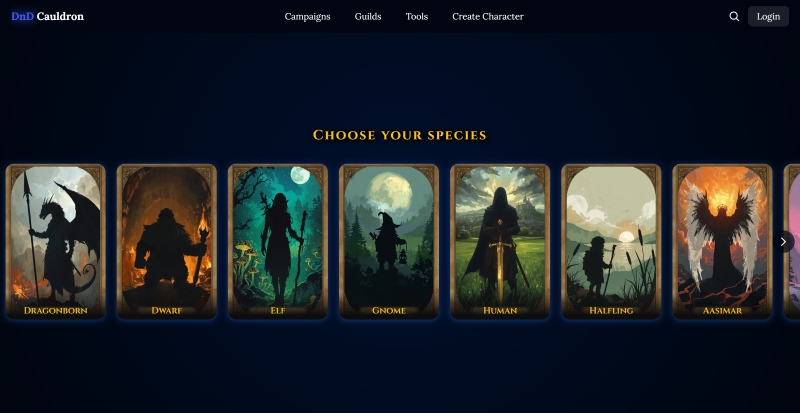
DnD Cauldron describes itself as beyond world that is more than just DnD characters. Its character maker is free, simple to use, and perfect for beginners. You can pick a species, select a class, and create your character.
It lets you explore the world around your character with interactive solo adventures you can play one chapter at a time. There is also a story editor for making your own adventures. This makes it a good option if you want both a character and a world to explore.
Key Features
- Free Character Species: With illustrated species and class pages
- Solo Campaigns: Interactive stories played chapter by chapter
- Campaign Editor: For authoring and running your own adventures
- Mutiple Generators: Covers companions, dungeon maps, monsters, items and NPCs
Pros
- Free to use, with a modern and approachable interface
- Perfect for beginners who don’t have a group yet
- Character, world, and campaign live together, which suits one-person play
- Class and species pages guide you as you go, instead of just showing a form
Cons
- Fewer species and subclass options than the official builder.
- It doesn't support AI art creation
- You need to log in to create or edit campaigns.
Pricing Plan
- Free to use
Who is it Best for
- Solo players
- Beginners
- Players who enjoy learning the classes as they pick them
6. NightCafe - Best DnD Character Creator for AI Potrait Online
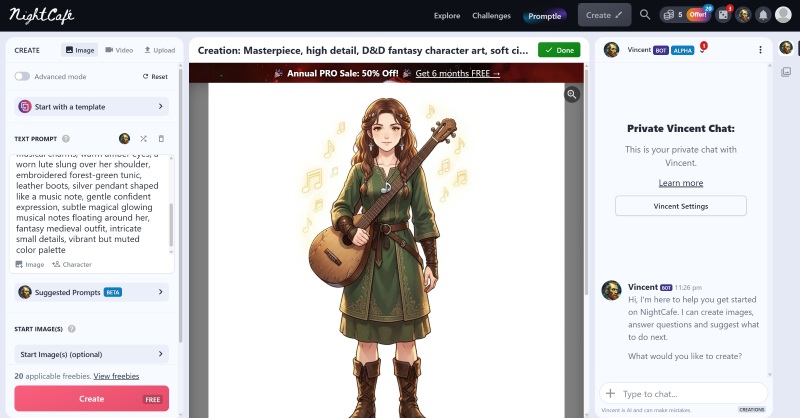
NightCafe is a powerful DnD character creator for AI portrait Online. Its D&D Fantasy Art Generator makes it easy to create a character's portrait. Just fill in details like race, class, equipment, and background, and the tool builds a full prompt for you.
This way, you don’t have to write long descriptions DnD character. It’s a simple and helpful way for D&D players to quickly see their character ideas and make their games more fun.
Key Features
- Consistent DnD Characters: Keep the same face throughout a whole campaign
- Editing Based on Prompts: A pencil sketch or moodboard can be the starting point instead of a finished picture
- Daily Challenge: Free prompt-writing gym, where you can also earn credits by entering and voting
- Commercial Rights: NightCafe transfers copyright assignment to the creator
Pros
- One prompt creates many truly different images
- You can use free-plan creations for business
- The challenge to improve at writing character prompts
- Purchased credits never expire and keep rolling over
Cons
- There is no list of species, no classes, no character art
- Picking the right model from hundreds is hard
- Free credits are limited
- Consistent characters require a paid plan
Pricing Plan
- For AI Hobbyist: $12.49/mo
- For AI Enthusiast: $12.49/mo
- For AI Creator: $12.49/mo
- For AI Artists: $12.49/mo
- Save 15% when you pay quarterly, or save 50% when you pay annually.
Who is it Best for
- Dungeon Masters
- Tabletop streamers
- Indie RPG publishers
- Concept artists and illustrators
- Anime and webtoon-styled game groups
A Quick Comparison Among Best DnD Character Creator
If you’ve already read the 6 reviews above, you can use this table to quickly return to them.
| Tool | Core Strength | Free Plan | Character Art | Ideal User | Beginner Friendly |
| CharaLab | Art DnD character creation from prompts | Yes | √ | Players who have the sheet | Yes |
| D&D Beyond | Free character sheet | Yes | √ | Board gamers | Yes |
| CharGen | Fantasy character creation | Yes | √ | Dungeon Masters creating many NPCs | No |
| Roll20 | It's virtual tabletop | Yes | × | Groups who want to start playing immediately | No |
| DnD Cauldron | Character world buliding | Yes | × | Solo players | Yes |
| NightCafe | AI Potrait Online | Yes | × | Concept artists and illustrators | No |
How We Tested the DnD Character Creator for New Users
If you are starting, it is more important to try creating a character on your own than to worry about following every rule exactly.
1. Updating D&D Character Race
How easy is it to change or add a species, not just choose one, but swap it later or even create your own?
D&D Beyond covers the full official list and lets you use homebrew options. DnD Cauldron has a smaller, illustrated list that is easy to browse. CharaLab takes an art-first approach, where changing the species is as simple as editing a word in your prompt and generating a new result.
2. Powerful Ability Scores
Assigning and calculating attribute values is usually the most boring part of making a character, which really shows how well the tool can handle tasks automatically. Just like modern design software can manage complex character layouts or color changes with one click.
A good character creator should automatically work out every adjustment, saving throw, and passive stat. When the tool calculates these quickly and correctly, it reduces player stress and makes the creative process much simpler.
3. Diverse Character Background
DnD character's background is important for developing their personality, as it shapes their basic traits and story path. This is like the strong background-removal tools in CharaLab, which let creators quickly remove distractions and focus on the main subject, saving time and effort.
In the same way, a DnD character creator’s detailed and adaptable background options help players quickly set a character's mood; also, many story templates make it easier for beginners to start and improve overall creativity.
4. Complete Set of Skills and Equipment
Skills and equipment form the basis of what a DnD character can do in the game, and having a large collection directly affects how much a player can enjoy.
Like asset packs and special-effect plugins in video editing or design software, a complete, well-organized collection of skills and gear saves players from the slow process of building everything by hand.
5. Lighting Character Concept Construction
Building a character concept is basically about making unclear ideas clear and real in a player's mind. This is like prompt optimization; users do not need to be experts who know every rule, just entering a few simple ideas lets the tool guide them step-by-step to the final result with easy prompts and live previews.
Which DnD Character Creator Should You Choose?
Six tools, six different answers. Rather than declaring a single winner, match the tool to your situation with these five questions.
1. Be Clear About What You Are Looking For
Decide which half of the job you need first. If you need numbers, go to D&D Beyond (official, free). If you need art, go to CharaLab or CharGen. If you need a place to play, go to Roll20. Beginners who buy an art tool hoping for a character sheet — or a sheet tool hoping for a portrait — are the ones who end up disappointed.
2. Free Trial Option
You can start building your character without spending any money. All the DnD character creators I mentioned in the article offer free plans. As a beginner, you can try them out without a subscription and see which tool works best for you. It's better to explore these low-cost options first than to pay a lot for other tools.
3. Friendly to New Users
Some DnD character generators can be tough for beginners to figure out. There’s a lot to learn, like choosing your class and background, connecting your character to the campaign, creating endless NPCs, and imagining what your character looks like. None of these steps are easy.
Traditional D&D character generators can get complicated. That’s why someone like using AI-powered tools like CharaLab and Chargen. As a new user working with AI, you'll find things much easier.
3. A 5-minute DnD Character Creation Workflow
Here’s a quick way to create a complete illustrated character in about ten minutes using CharaLab as an example.
- Start by getting the character sheet, which takes about 3 minutes. Write a short prompt ahead of time with the character’s species, class, outfit, and style. Generate the portrait and keep trying until the face looks right.
- Next, finish the details in about 2 minutes. Give your character a name and choose one or two background traits. You can also change or remove the background, or take off the watermark if you want.
- When you’re ready, download the finished character to your computer. Use it however you like.
That’s all there is to it: just create the sheet, add the details, and download—no need to open a rulebook.
FAQ
What is the best DnD character creator in 2026?
There is no single best option because the tools serve different purposes. For character art that makes your character stand out, CharaLab creates finished portraits in over 20 styles within seconds. In CharaLab, you can quickly get a basic idea of D&D characters without spending much time learning or needing any technical skills.
Is there a free DnD character creator?
Yes, as I mentioned before, all the DnD character creators I listed offer a free trial. You don’t need to worry about high costs, these free tools let you get started with DnD easily. You can try them before deciding whether to pay for extra features.
What should I put in a DnD character prompt?
A strong DnD character prompt covers six things in one sentence: species, class, level or tier, build and gear, pose, and art style. Species and class show who the character is, gear and pose shape their outline, lighting sets the mood, and the style tag keeps portraits consistent. If your generator lets you use character references, save one approved portrait and use it again instead of rewriting the prompt each time.
Which free DnD character creator is suitable for professionals?
For professionals, capability matters more than price. Dungeon Masters benefit most from D&D Beyond, it's Master tier lets a group share content, making it the most affordable way for a table to pool purchased books.
How do I make a DnD character quickly with AI?
In CharaLab, you can create DnD character with AI: First, start by making the character sheet and get a short prompt ready, including the character’s details; second, give your character a name and choose one or two background traits. Third, when you’re ready, download the finished character to your computer
Conclusion
When people talk about "the best dnd character creator," they usually mean two different tools with the same name. One tool helps you make the character sheet, and the other helps you create the character itself. Beginners often get confused because free sheet builders, even though they work well, leave the portrait slot empty. That empty spot is often where the excitement fades.
So, start by picking a DnD character creator that really fits your workflow:
- Already have a DnD character ideas? CharaLab must be the best choice
- Use D&D Beyond if you want the official, free, and rules-legal sheet
- Select Charagen if you already have a character sheet.
- Want to build and play in the same tab? Use Roll20
- Try DnD Cauldron if you want to build a character world
- Want plenty of character template? You can try NightCafe
Combine your character details with your chosen DnD character generator, and your first character will feel like your own, not just another assignment.
 8 Best OC Generator for Consistent AI Characters (2026) >>Are you searching for the best OC generator? This guide compares the 8 best OC generators, which will help you choose the right one for your consistent OCs. >>
 10 Best 3D Character Creator Tools in 2026(Reviewed & Ranked) >>Which is the best 3D character creator in 2026? Simply follow the comparison of 10 tools based on features and pros/cons, to find the right tool for your work. >>
He is an experienced expert in AI character creation and has led the early design of many virtual character products. His step-by-step guides help creators build the AI character online from scratch. Here, he turns complex character prompts into different character styles, helping every human-machine collaboration get closer to the perfect character you imagine.