
- AI Image GeneratorAI Character
- AI Video Generator
- AI Image ToolsAI Video ToolsOther Tools
 AI Image Generator
 AI Character
 AI Art
 AI Video Generator
 Other Tools
- AI Image Generator
- AI Art
- AI Video Generator
- AI Video Effects
- AI Image Tools
- AI Video Tools
- Other Tools
- Start Now
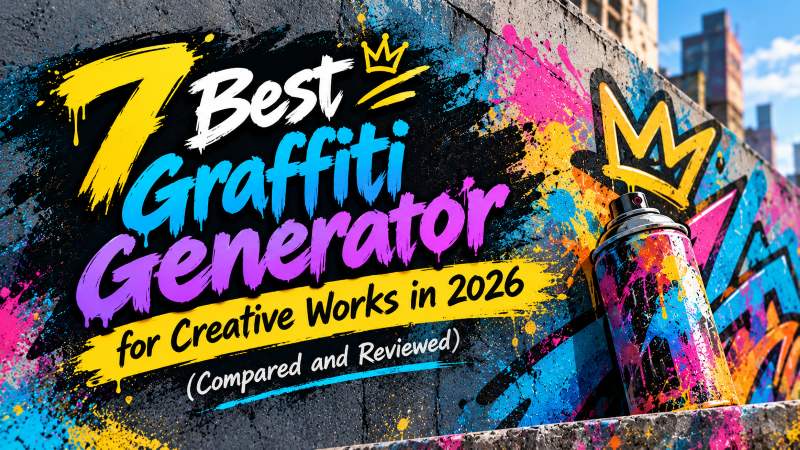
7 Best Graffiti Generators for Creative Works in 2026 (Tested and Ranked)
 SprakinsLast Updated: 2026/10/28
Why a graffiti work usually takes a graffiti generator about1-2 minutes, doing the same thing offline often takes longer? Since most graffiti generators are just font changers. When you type in a name or logo, the generator puts it into one of a few templates, and everyone who chooses that template gets the same design.
By 2026, some graffiti generators that use image models can create more creative graffiti in seconds. Some other generators focus on giving you a fixed template to control font shapes and logo design. However, few tools are good at both.
So, this guide picks the 7 best graffiti generators to compare and review. Each tool was judged on its key features, pros and cons, use cases, and pricing. The goal is to help you find the one that best fits your creative graffiti work.
What is Graffiti Generator?
A graffiti generator is a tool that turns typed words into paint-style lettering. Some use pre-drawn letters from a font library, while others create new images based on your description.
The first kind of generator is like a design tool, letting you pick a style and adjust things like colors, outlines, shadows, spacing, and depth step by step. The second kind is more like a camera: you describe the wall, the colors, and the mood, and the tool gives you a generated picture.
Hand-Drawn Graffiti vs AI-Generated Graffiti
Hand-drawn graffiti starts with artists' hands. The artist chooses where the fonts go, how much empty space to leave, and how the fill works with the outline. These choices are what make the art. If you use a generator that just picks a font, those decisions are already made, so the result often looks ordinary compared to a real artwork.
AI-generated graffiti changes the process. You lose the chance to adjust small details like a single part, but you gain realistic surfaces, lighting, and backgrounds that would take hours to paint or edit.
7 Ways Graffiti Generators Can Be Used
Here are some use cases you can work with a graffiti generator.
1. Street Art
A graffiti generator lets street artists preview their work on a virtual wall, so they can try out different colors and proportions without spending much. Beginners can use a graffiti generator to display their digital designs onto a real wall for easy tracing.
2. GIF Generation
Nowadays, dynamic graffiti-style text often captures the audience's attention more effectively than static images. Creators can generate animated GIFs, which can be widely used in marketing posts on social media platforms such as Instagram and TikTok to significantly boost engagement.
3. Make 3D Fonts
Designers no longer have to learn complicated and time-consuming 3D modeling software to make eye-catching 3D typography. With a graffiti generator, they can quickly turn plain text into something special by adding realistic shadows and 3D effects.
4. Graffiti Tag Creation
If you are new to graffiti, generators are a great way to try out different tag styles. They let beginners experiment and create a unique tag that shows off their personal style.
5. Graffiti Drawing
When art lovers feel stuck in front of a blank canvas, a graffiti generator can help spark new ideas. It might suggest unusual layouts, bright color mixes, or playful character designs that are great for brainstorming. It also works well as creative prompts in art classes, letting kids try coloring designs on digital drawing tablets.
6. Logo Design
Traditional logo designs can feel too hard for skate shops, brands, or esports teams. Graffiti generators offer a quick way to create logo typefaces with a distinctive look. They use real elements like paint splatters, drips, and rough brushstrokes, making it easier for established brands to shift toward a younger, more modern image.
7. Digital Letters
Just enter your text to quickly create high-resolution PNG images of digital graffiti-style letters with transparent backgrounds. You can easily drag and drop these polished images into web banners, e-commerce posters, YouTube thumbnails, PowerPoint slides, or album covers.
3 Questions to Ask Before Choosing a Graffiti Generator
1. Are You Animating a 2D Graffiti or a 3D Graffiti?
In 2D graffiti, the letters remain flat, but some other elements will change. For example, uneven graffiti color, or a line could be messy. In 3D graffiti, the 3D models move around the letters, which requires professional skills that flat images don't have.
If you only want 2D effects, a GIF tool will work. For 3D effects, make sure the tool can change an image into a 3D style, since most tools can't do this.
2. Do You Need Font Graffiti, Graphic Graffiti, or Both?
Font graffiti is about controlling typography, like picking a style and adjusting weight and outline. Graphic graffiti is about creating a full scene, including characters, wall textures, and background details.
Not many tools offer both at a professional level. Figure out which one your project needs most, and be ready to use a second tool if you need the other features.
3. Do You Use Graffiti in Reality or Online?
Physical limits matter. If you’re making a wall piece, it has to be readable from 50 meters away and printable at a large size, so you’ll probably need to use a high-resolution graffiti. Online, you can get away with lower resolution, but you have to watch file size and transparency.
Which Tool Is the Best Graffiti Generator? The 7 Tools Compared and Reviewed
Below is what each generator is actually good at, where it falls short, and the specific kind of creative work it fits.
1. CharaLab - Best Graffiti Generator for Street Art with AI
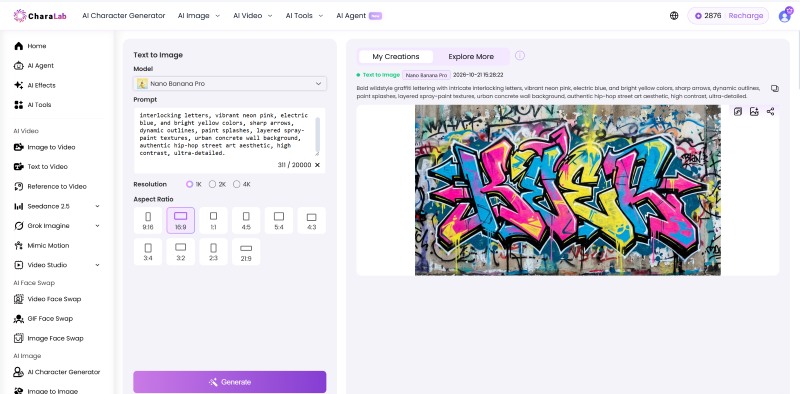
CharaLab is an AI graffiti generator around characters, and that is why it works for street art. Instead of isolating letters on a white canvas, it generates the whole scene around them: the wall surface, the lighting, the surrounding street furniture, the character standing in this graffiti.
In CharaLab, you can upload a sketch to redraw it in the same layout, change the style of a photo of a real wall, or animate a finished piece using image-to-video or other video effect templates. Plus, you can download results in HD without a watermark, even on the free plan.
Key Features
- Street Art Prompting: Your prompt is well-suited for describing street art, and it can be well understood
- Image-to-image Restyling: Upload a marker sketch or a photo of a blank wall and get a painted version
- Graffiti Effects: Turn a finished graffiti into a short clip with atmospheric movement
- Built-in AI tools: Street background removal, art detail enhancement, and upscaling before print
- 20+ Graffiti Styles: You can try out different graffiti styles to help your artwork stand out
Pros
- Ultra-fast generation so you don’t have to wait
- Export your graffiti for free without a watermark
- Create realistic 3D graffiti effects
- Use it for posters, short videos, stickers, and more in reality
Cons
- It does not include font styles
- This is not a full graffiti generator
Use Case
- Muralists and street artists
- Sticker brands
- Social content producers
- Community art organizers
Pricing
- A Free trial is available
- Pay-as-you-go pricing plan
2. Gifify - Best Graffiti Generator for AI GIF Online
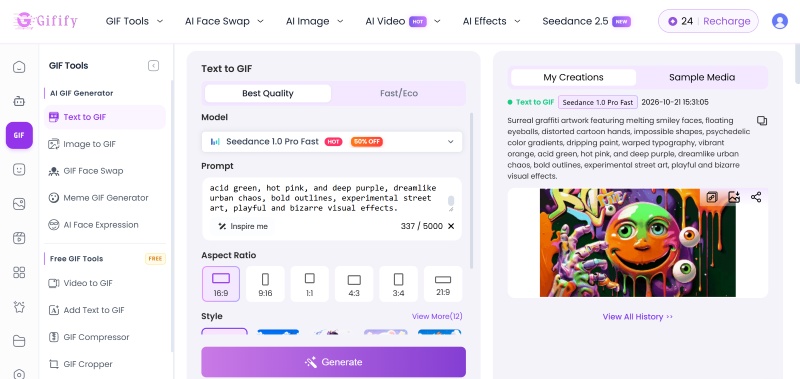
Gifify is a special tool in this list. It is an AI GIF tool. For graffiti, the most useful features are text-to-GIF, which loops an animated logo or tag, and image-to-GIF, it combines several shots into a dynamic graffiti that makes it look like the piece is painting itself.
Same as CharaLab, Gifify offers a transparent background option and a 4K download to solve two common problems: unwanted vague graffiti background and messy objects. Also, you can use basic features for free each day without signing up.
Key Features
- Text to Dynamic Graffiti: Graffiti generated in Gifify is animated GIFs by default.
- Image to GIF Graffiti: A variety of style choices, along with GIFs, creates more creative graffiti
- High Resolution: 4K upscaling to keep graffiti edges sharper
- GIF Tool: GIF face-swapping and an anime GIF maker for reaction content and character-driven content
- MeMe GIF Generator: You can take popular meme templates and turn them into some funny graffiti
Pros
- It is the only tool here that consistently gives motion images without needing a video editor
- It's a powerful tool for entertainment online, best for 2D graffiti
- No sign-up for basic features, so it is the fastest way to test
- Its output can be used commercially
Cons
- You can't pick a letter graffiti style
- Focuses on GIF generation only
Use Case
- Streamers
- Community managers
- Influencers
- Indie game developers
Pricing
- Daily free credits
- On-demand payment
3. Graffiti Empire - Best Graffiti Generator for 3D Font
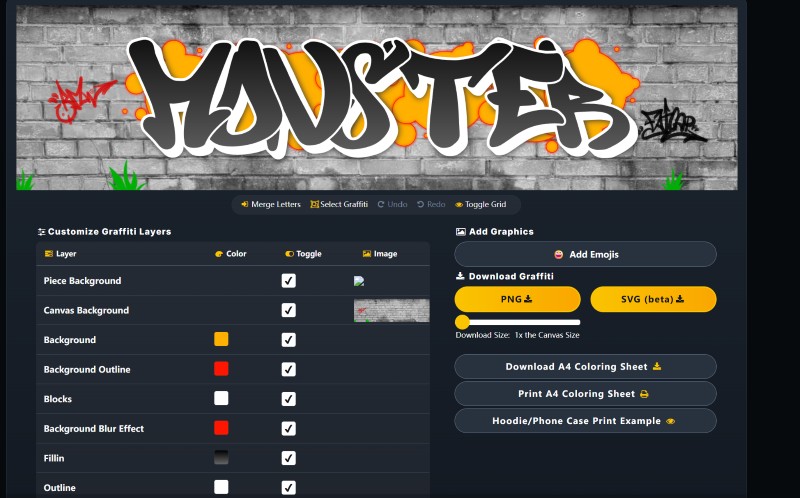
Graffiti Empire is a traditional graffiti tool that offers 3D font styles, and it is also the one that understands font structure best. Its generator is a virtual canvas: You choose a font, type in a name or word, click create, and then build your graffiti design.
In addition to creation tools, the website offers organized learning materials and creative resources, including step-by-step drawing guides for specific words, an introduction to the history and culture of graffiti, plus a collection of graphic styles to help users move from hand-drawn.
Key Features
- Comprehensive 3D Graffiti Tool: You can add color, outlines, 3D styles, and backgrounds on separate layers. This make it feel more like a digital graffiti tool
- Merge Letters Function: It lets you connect graffiti so they become one continuous piece instead of staying separate.
- Non-image Outputs: Like A4 coloring sheets, print files for apparel and phone cases, and SVGs
- Graffiti Letter Library: There’s a library of over 150 A-to-Z letter references and drawing tutorials
- Graffiti Tutorials: Provides as many learning materials as possible for beginners.
Pros
- Real letterform control without a design degree
- Free to generate without an account
- The built-in teaching material means the tool can be used to learn in reality
Cons
- All results use a fixed font, so if two people pick the same style, they'll get the same base design but with different colors
- You’ll need a site membership to download full generator files
- The interface looks a bit outdated compared to other tools
Use case
- Art teachers and workshop leaders
- Print-on-demand
- Beginning writers
- Tattoo artists
Pricing
- US$6.30/mo
4. Recraft AI - Best Graffiti Generator for Custom Tag
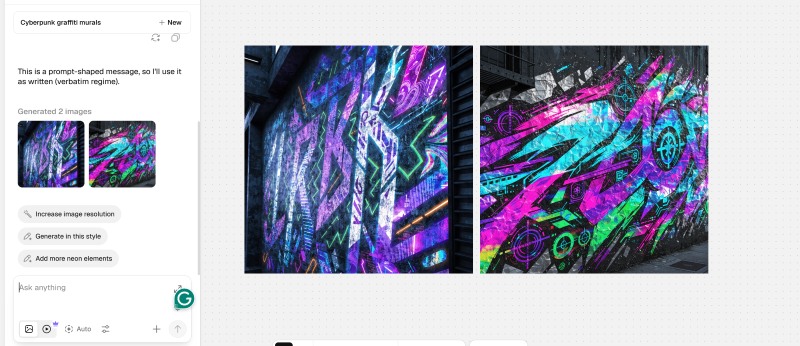
Recraft's graffiti generator is a tool within a larger design platform, designed for people who want a customized tag rather than just one good image. You choose a style, prepare your prompt in advance, select a color palette and surface, add details, and then perfect your design in Recraft Studio.
You can combine styles like wildstyle, bubble, and more in a single design. Once you find a style you like, you can save it and use it again. Exporting your work is simple; just click to save it as a JPG, PNG, or SVG. SVG files are especially useful because they let you use your work as a real design asset, not just a picture.
Key Features
- Graffiti-specific Style: Wildstyle lettering, bubble tags, stencil, blackbook sketches, full wall pieces
- Mixed Tag Style: Within a single piece, plus the ability to save a custom style and lock it for future generations
- Multiple Export Formats: SVG export alongside JPG and PNG, with full-resolution output
- Prompt-level Control: You can describe your idea in a short brief
- Studio Editing After Generation: Allows for post-processing of the graffiti tags you generate
Pros
- Vector export is the most useful feature
- Saved custom styles help keep tags consistent
- You can go from a brief to a print-ready file quickly
- The graphic, flat image style works better than 3D fonts
Cons
- Complicated wildstyle can make words hard to read
- Free generation depends on your plan
- You can't change single letters, so if one letter looks wrong, you have to redo the whole piece
Use case
- Brand marketing
- Identity designers
- Streetwear and skate labels
- Packaging and editorial illustrators
- Creative agencies
Pricing
- Basic plan: $10/mo
- Pro plan: $16/mo
- Teams plan: $18/mo
5. Morphic - Best Graffiti Generator for Drawing Work
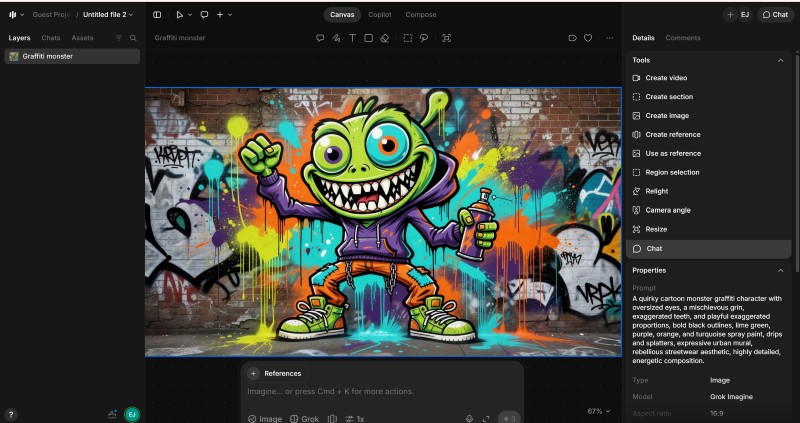
Morphic is a storytelling and graffiti generator, not just a tool with AI. Its workspace is a canvas where you can place sketches, references, and your drawing work together. You can segment selected objects, use prompts to guide changes, upscale images, and save references to keep a graffiti or style consistent from scene to scene.
This is important for graffiti drawing because most of the work involves revising, not just creating from scratch. If a piece has one broken letter, you don't have to start over; you just need to repaint that letter. Morphic's inpainting tool helps with this, and its resizing tool lets you expand a composition beyond its original frame.
Key Features
- Canvas Workspace: It lets you see sketches, references, and outputs in one view for your drawing work
- Painting for Localized Fixes: You can repaint a single letter; it shows more dedicated revision
- Saved References for Graffiti: Keeping a graffiti artwork consistent across frames
- 3D Motion: Letting you place camera angles in 3D space and generate depth-based movement along a wall.
- Frames to Video: Select two to five frames of a scene and generate the in-between motion
Pros
- Partial editing is faster than starting over
- Consistency tools help when you need to show sequences
- The tool includes team collaboration features, making it a good fit for studios
Cons
- There are no options for lettering vocabulary or font controls
- The interface can feel overwhelming at first, and it takes some time to get used to it
- Trying different versions burns through credits fast
- It’s more than you need if you just want to make a single drawing work
Use case
- Muralists and public-art consultants
- Film and television art departments
- Game studios
- Creative agencies
Pricing
- Free tier is available
- Basic tier: $19/mo
- Standard tier: $24/mo
- Pro tier: $45/mo
- Max tier: $170/mo
6. Ima Studio - Best Graffiti Generator for Logo Design
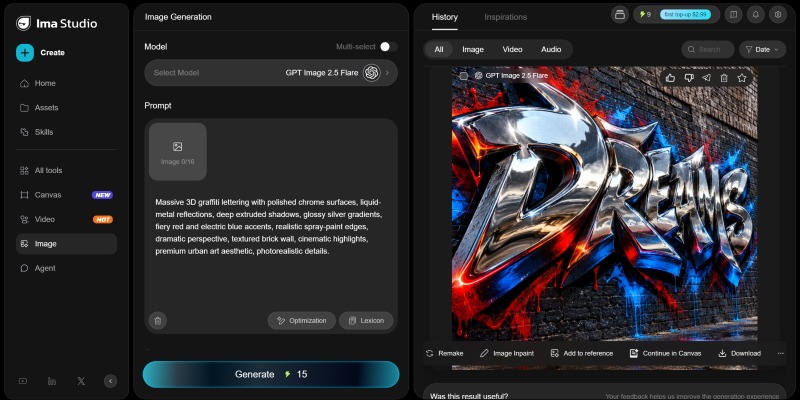
Ima Studio's graffiti tool is built for logo design. The brief can start from almost anything: a word, a name, a slogan, a rough sketch, a brand mark, or a style reference.
For logo work, you can start with what makes it useful. Most generators only let you enter a word, which works for a tag but not for a brand that already has a logo. Ima lets you upload your mark or a sketch and generates graffiti-style versions.
In the refinement workspace, you can adjust details like spacing, angles, texture, mood, colors, background, stroke weight, and aspect ratio to see if a design direction works. The platform also offers cleanup tools, such as a background remover and image text editing, to help you finish your logo.
Key Features
- Logo Design: Come up with graffiti-inspired ideas for T-shirts, stickers, album covers, social posts, campaign graphics, and logos.
- Fast Style Comparison: Across bubble, wildstyle, stencil, 3D depth, and so on
- Radable Lettering Function: With a dedicated mode for turning words, names, and event titles into legible street-art logos
Pros
- Lighting speed of each AI-generated graffiti logo
- Works better for existing brands instead of just a letter
- The refinement focuses on the key details for a logo
- More friendly to graphic/2D graffiti
Cons
- No vector export
- Output formats are not displayed on the function page
- Login and credits are required
- Consistency between each version is weak, suitable for online creation
Use Case
- Small business owners
- Merch and graphic designers
- Esports teams
- Event promoters
Pricing
- $20 = 1,000 bonus
- $50 = 3,000 bonus
- $100 = 7,500 bonus
- $200 = 18,000 bonus
- $500 = 50,000 bonus
- $1000 = 105,000 bonus
7. Graffitigenerator.art - Best Graffiti Generator for Digital Letter
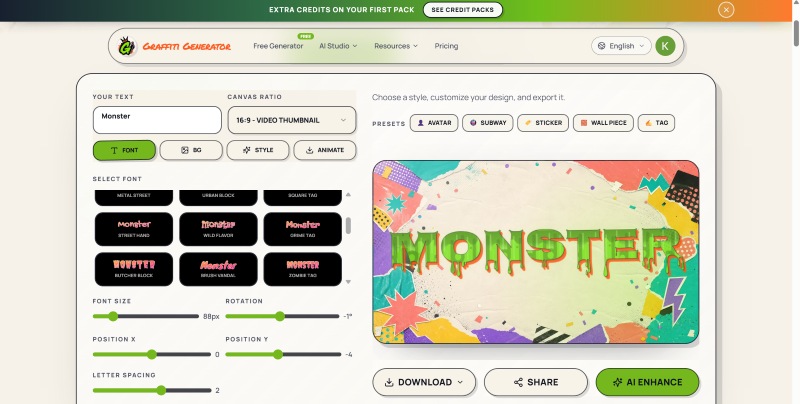
Graffitigenerator is best for digital letters, and its functions are divided into two parts.
Text Graffiti Mode is free, does not require an account, and lets you can pick a style and adjust font size with instant previews.
The second option, AI Artwork Mode, is a paid function. It uses one-time credit packs instead of a subscription and lets you download watermark-free images in 2K or 4K, depending on the pack you choose.
Key Features
- Free vs Paid Digital Letter Option: Try the free text graffiti mode; you can easily adjust graffiti size, rotation, position, letter spacing, layer colors, outlines, shadows, and effects
- Graffiti Enhance Function: Use the Enhance feature to turn your finished graffiti design into a texture
- Rich Graffiti Style Library: Style library covering throw-ups, handstyle tags, chrome and silver, stencil and 3D, characters, and full-color pieces.
- Beginner-Friendly: A-to-Z letter tools and a dedicated letter generator for initials and short letter groups
Pros
- You don’t need an account, and you can really edit it
- Typographic controls work better than guessing with prompts
- Enhance keeps your layout the same and adds realistic details
- One-time credits that never expire are much better for occasional users
Cons
- Text mode uses templates; had to keep novelty
- Wall realism does not match graffiti
- Many of the style names are similar to those of competitors
Use Case
- Hobby writers
- Gamer tag and username artists
- Poster print sellers
- Design students
Pricing
- $4.99/mo
- $9.99/mo
- $29.99/mo
Quick Reference: Best Graffiti Generator in 2026
Here is a quick reference in the following table to support you go through this guide.
| Generator | 2D/3D | Font/Graphic | Reailty/Online | Pay-as-you-go |
| CharaLab | Both | Graphic | Both | √ |
| Giffiy | Both | Graphic | Online | √ |
| Graffiti Empire | 3D | Fonts | Reailty | × |
| Recraft AI | Both | Graphic | Online | × |
| Morphic | 3D | Graphic | Online | × |
| Ima Studio | 2D | Fonts | Reailty | × |
| Graffitigenerator | 2D | Fonts | Reailty | × |
How to Choose the Right Graffiti Generator
1. Match Graffiti Style
Focus on what you actually need, not just what the tool advertises. For example, if you need fonts for a sticker and logo, a template editor will work better than a graphic generator.
But if you’re designing a piece for a specific wall for a client presentation, the graphic generator like CharaLab and Gifify is a better choice.
2. Check Text Accuracy
If you ever see your own name spelled wrong, you’ll probably stop trusting the graffiti generator. Try testing it with a word that has double letters and at least one unusual letter, because these are common trouble points.
After that, see what happens when it makes a mistake: can you fix just the bad letter, or do you have to redo the whole image? Being able to fix small mistakes is valuable; otherwise, a simple five-letter word might take 20 tries.
3. Cost
We ranked 7 graffiti generators by the actual cost you pay to get a finished piece, starting from the cheapest to the most expensive:
- CharaLab and Gifify: Pay-as-you-go
- Graffitigenerator.art
- Graffiti Empire
- Recraft AI
- Morphic
- Ima studio
If you’re new to AI graffiti, tools like CharaLab and Gifify make it easy to get started. You can use daily check-in credits to try them out before paying. When you compare different options, look at the cost for each usable graffiti design, not just the monthly fee.
4. Usage Rights
Make sure to check the license before putting artwork on a product. Some tools clearly allow commercial use, while others just say the files are ready to print. Keep in mind that two questions often get mixed up:
- whether you own the output
- whether it might infringe on someone else's trademark.
If you generate a word that matches an existing brand or a well-known group name, you could run into trademark issues.
Common Challenges When Using AI Graffiti Generators
1. Incorrect Letters and Unreadable Text
Generators often struggle with long prompts. Letters can merge, double letters may become a single letter, and the last graffiti might be cut off.
To fix these, try shortening the text, spelling it out letter by letter in your prompt, and creating several versions before choosing the best one. If you need the text itself and not just a decorative element, use a template-based editor that lets you place each letter directly.
2. Limited Control over Graffiti Styles
Prompts don’t always give clear results. For example, Wild-style graffiti might mean one thing to a writer but means much less to a large language model, so you could get anything from wildstyle to cyberpunk with a random graffiti generator.
Using tools like CharaLab and Gifify, saving and mixing styles, or using reference images helps turn that vagueness into something you can repeat; it will help you a lot during your creative process.
3. Low-Resolution
Generated graffiti can look sharp on your screen but may not hold up when printed. Before you print, check the pixel dimensions and compare them to the size you need.
For example, a 1024-pixel image is about 8.5 cm at 300 dpi. That works for a sticker but not for a wallpaper. Upscaling can add some detail, but only vector exports keep their quality no matter how much you scale them.
4. Editing Limitations
Most graffiti generators only let you generate again, which can be costly if your result is already almost right. So, it's a better choice to look for features like local painting, local editing, background removal, or text replacement. Being able to fix just one part makes a tool useful for real projects, not just for getting lucky with one good result.
FAQ
How to Create Realistic Graffiti with AI for Myself?
Take a photo of the real wall, making sure to capture its flaws. In your prompt, describe the surface, mention the material, color, moisture, and which way the light falls.
Use short words and pick your color palette like you’re choosing spray paint cans. Add details that make it look real, like drips at the bottom of letters, a keyline, or a shadow under an overhang.
Can I Use Online Graffiti Generator for Commercial Projects?
The answer depends on which tool you use and how you plan to use it. CharaLab and Gifify allow commercial use of their GIFs, videos, and images. Graffitigenerator.art lets you use free text exports commercially and includes commercial rights in its paid credit packs.
For Recraft, Morphic, Ima Studio, and Graffiti Empire, check their latest terms before using their content. Also, make sure any words or designs you create don't copy an existing brand or crew.
Can CharaLab Create 3D Graffiti?
CharaLab can create 3D lettering using prompts for your graffiti. The result often appears convincingly painted on a wall. However, it lacks an extrusion or font control panel, so the letters' shape depends heavily on the prompt.
For more precise and customizable 3D letterforms, use a font-based generator, then bring the result into CharaLab for the wall scene, lighting, and motion.
How Can I Make AI-Generated Graffiti Look More Authentic?
Use an AI-powered graffiti generator, stick to three to five colors, just like a writer who only has a few cans to work with. Add some features on purpose, like uneven fill or spots on your graffiti.
Make sure the piece isn’t perfectly symmetrical, because real graffiti usually isn’t. Place it in a real setting with natural light; if the edges are too perfect and the fills are too even, it’s a clear sign the image was made from a prompt.
Is There a Free Font Generator for Graffiti?
Graffiti Empire offers a free online generator with a font library that features 3D styles and over 150 letter references from A to Z for practice. CharaLab also has a free text mode with all its styles.
What Do Graffiti Artists Use?
On the street, artists use physical tools like mops and markers for tagging, aerosol cans with different caps to change line width, and a black book for sketches and planning.
Conclusion
There isn’t a single best graffiti generator; just pick the best one for your needs.
- If your project is about the wall graffiti, how a piece looks in real light on real brick in reality, CharaLab should be your first choice.
- If you need accurate, print-ready letters by tomorrow, try Graffitigenerator.art or Graffiti Empire.
- For files that need to scale up to four meters, only Recraft AI’s SVG export handles it without extra tracing.
- If you want a price before you start painting, Morphic’s consistency and motion tools are made for that.
- If you’re looking for inspiration instead of a finished piece, Ima Studio and Gifify offer concepts at a much lower cost than usual.
To choose the best graffiti generator, start with the free tier, which gives you HD, watermark-free images is important. Move to paid options when you have a client or product attached.
 10 Best 3D Character Creator Tools in 2026(Reviewed & Ranked) >>Which is the best 3D character creator in 2026? Simply follow the comparison of 10 tools based on features and pros/cons, to find the right tool for your work. >>
 8 Best OC Generator for Consistent AI Characters (2026) >>Are you searching for the best OC generator? This guide compares the 8 best OC generators, which will help you choose the right one for your consistent OCs. >>
 6 Best DnD Character Creators from a Beginner's Perspective >>Looking for the best dnd character creator in 2026? This guide lists the 6 best creators for new users in DnD. >>
 8 Best AI Pet Portrait Generators for Pet Owners in 2026 >>Searching for the best AI pet portrait generator for your cute pet? Simply follow this guide to choose a dedicated pet portrait generator. >>
He is an experienced expert in AI character creation and has led the early design of many virtual character products. His step-by-step guides help creators build the AI character online from scratch. Here, he turns complex character prompts into different character styles, helping every human-machine collaboration get closer to the perfect character you imagine.