
- AI Image GeneratorAI Character
- AI Video Generator
- AI Image ToolsAI Video ToolsOther Tools
 AI Image Generator
 AI Character
 AI Art
 AI Video Generator
 Other Tools
- AI Image Generator
- AI Art
- AI Video Generator
- AI Video Effects
- AI Image Tools
- AI Video Tools
- Other Tools
- Start Now
Mascot Generator: How to Create Your Own Mascot with AI in 2026
 SprakinsLast Updated: 2026/10/30
Why do most brands have a logo, but not all have a mascot generator for a mascot? A logo helps people recognize a brand, while a mascot is a memorable character that builds an emotional bond.
In the past, making a mascot usually meant hiring an illustrator, learning complex design software, or using generic images. Now, mascot generators make it much easier to create an original mascot in just minutes. You don’t even need artistic skills or a big design budget.
In this guide, you’ll learn what a mascot is, where you can use one, how AI-powered mascot generators compare to traditional methods, and how to make your own mascot step by step.
What is a Mascot and Why Are They So Popular?
What Does Mascot Mean?
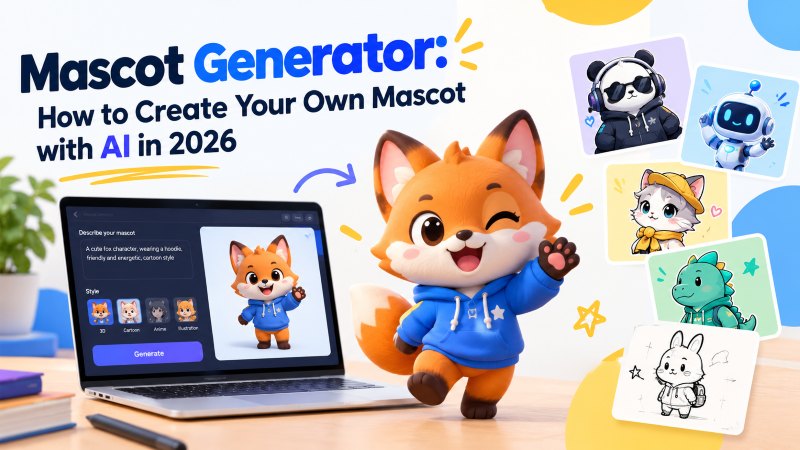
A mascot is a character that represents a group, sports team, brand, school, or company. It might be an animal, a person, a creature, or even a faceless object.
A mascot is totally unlike a logo. A logo is made once and always looks the same. A mascot can move, react, dress up for different scenes and festivals, and show up in unexpected situations. Its personality is what makes it valuable.
Where Are Mascots Used?
Once you start looking, mascots could be anywhere:
- Famous Brands
- Sports Teams
- Schools and Universities
- Food and Beverage
- Esports and Gaming
- Online Communities
- Product and App Design
- Events and Conferences
- Public campaigns and Company
Why Do Mascots Matter for Brands and Communities?
Mascots have become more and more important for brand construction and communities because of the following 3 aspects:
- They can quickly increase brand awareness. The appearance of a mascot helps build brand recognition, allowing the brand to stand out from competitors in the same industry and leave a lasting impression on users
- It’s great for merchandise. Plush toys, stickers, emojis, and other mascot-related merchandise
- It helps build a sense of community. The communities also include schools, companies, and other organizations mentioned earlier. Foster a stronger collective sense of belonging within the community
Based on the points above, mascots clearly increase our product’s reach across both brands and communities, making communication easier and more convenient.
What is a Mascot Generator?
A mascot generator is a tool that turns your input, usually a written description, sometimes a rough sketch or a photo, into mascot artwork. An AI-powered one doesn't hand you a library of ready-made parts to put together; it generates a new mascot based on what you asked for, so the result isn't something another brand can accidentally reproduce.
Traditional Mascot Design vs AI-Powered Mascot Generator
Here's a quick comparison between them:
| Method | Cost | Time | Skill Required | Uniqueness |
| Hire an illustrator | $300–$5,000+ depending on your demands | 2–6 weeks | None | High |
| Design it yourself | Free, plus a lot of your time | Days to weeks | High | Depends on your skill |
| Mascot template | $0–$50 | Minutes | Low | Low |
| AI mascot generator | Free tier available | Minutes | None | High |
When you hire an illustrator, you get the exact mascot you ask for but at a high cost. However, with an AI mascot generator, you get a mascot quickly and at a lower cost; you may need to make a few adjustments. For most teams, especially those without a mascot yet, trying an AI mascot generator can be a good option.
What Can a Mascot Generator Actually Do with AI?
Modern generators do much more than just turn a sentence into a picture; they also help to create a mascot with:
- Build a mascot from prompts
- Work from a reference
- Hold a consistent look across scenes
- Produce the formats a mascot actually needs
- Output a usable mascot template
- Turn a still mascot into alive
The last three functions are the difference between an AI-powered generator and a mascot generator. Generating 1 cute mascot is easy. How about generating 10 mascots? This is what separates a mascot generator from a general image tool.
Why CharaLab Stands Out Among Mascot Generators?
Notably, not every tool that can draw a character is a mascot generator.
CharaLab is an AI character generator that goes beyond making standard characters. You can use it to create mascots that represent your brand, product, or organization, giving them unique looks and personalities.
By adjusting prompts and trying out different character styles, you can develop mascots for your own purpose. Its image-to-video feature also lets you animate these mascots and bring them to life.
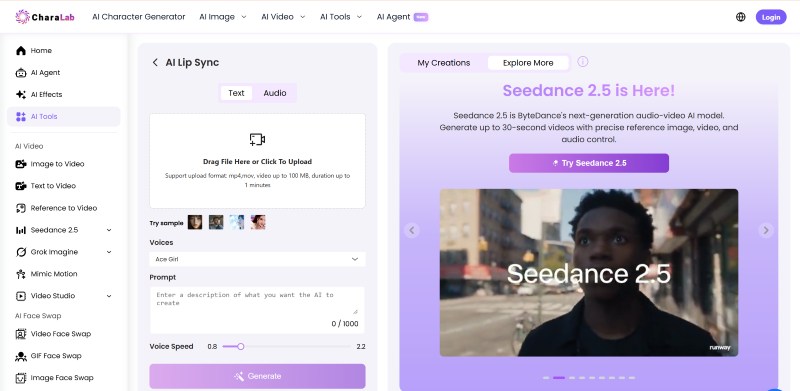
In CharaLab, you can start in different places depending on the mascot you want to make. For example:
- The Chibi Maker for a chibi-style brand mascot
- The AI Cartoon Generator for a flat cartoon look
- The 3D Character Creator for a dimensional product mascot
- The AI Character Sheet Generator for a turnaround reference
Each built-in tool uses the same prompt logic, so your mascot description works across all of them.
How to Create a Mascot Online for Free
The Traditional Way
In the traditional way, here’s how a team usually designs a mascot when they don’t have a designer:
- Write a brief describing the mascot’s features, such as fun, friendly, and memorable
- Spend two hours looking for mascot design ideas and save about 60 images
- Message three illustrators. Waiting for their replies
- The quote is very high for a single pose
- Revisions are billed separately
- Launch with only one pose, because more poses cost more
- Six months later, you need another festival version and start the whole cycle again
Do these sound familiar? Most teams never really get a mascot. Instead, they have one mascot image.
The AI Way
Here's the same job with an AI mascot generator:
- Write one sentence about the character
- Pick a style and a frame
- Generate
- Keep the version that works, adjust one thing, generate again
- Save the best prompt as your foundation
- Build the rest of your assets from that foundation
With an AI mascot generator, the first draft only takes minutes instead of weeks. Even better, making a mistake just means clicking again, so you can try out ideas you’d never pay for. That’s often how you find the best mascot.
It’s not magic. Sometimes the AI will misunderstand a word, or create a character with the wrong number of fingers. You’ll just try again. That’s part of the process, not a mistake.
What to Prepare Before Creating a Mascot
Spend five minutes on these before you start. It saves thirty minutes of regenerating:
- Who it represents
- Outstanding personality
- Mascot species
- Where it will live
- Two or three brand colors
- One signature feature
You just need a clear direction and idea to keep your mascot consistent.
How to Use CharaLab to Create Your Own Mascot?
The following five steps take you from a blank page to a mascot you can actually create with CharaLab.
Step1 - Choose an AI Model for Your Mascot
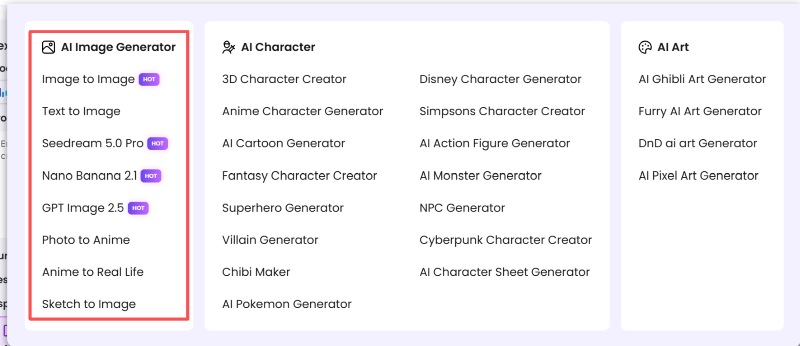
At the top of the generator, you'll find some popular large language models. These model have their own advantages in processing images and video. Here are some powerful models:
- Seedream 5.0 Pro: Complex scenes and cinematic-quality motion
- Nano Banana 2.1: Fast and balanced, a good default for drafting
- GPT Image 2.5: Strong at following long, specific descriptions and making targeted changes
Begin with Nano Banana 2.1 when you’re still deciding on your mascot. It’s fast, so you can try out lots of ideas quickly. When you’re happy with the design, move to Seedream 5.0 Pro to create the cinematic-quality outfit you’ll publish.
Step2 - Prepare Your Mascot Prompts
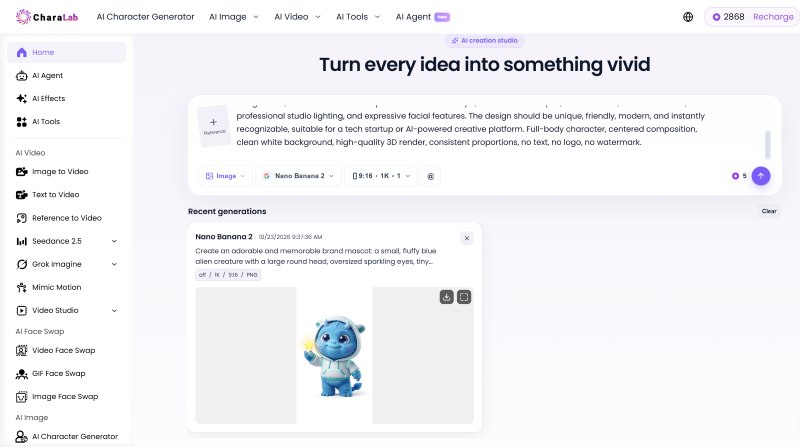
This step decides if you get a real mascot or just a common cute animal. A good mascot prompt should have eight main points, usually in this order:
- Art style
- Character type
- Body and proportions
- Face and expression
- Colors
- Outfit or props
- Pose
- Background
Step3 - Pick a Suitable Visual Style
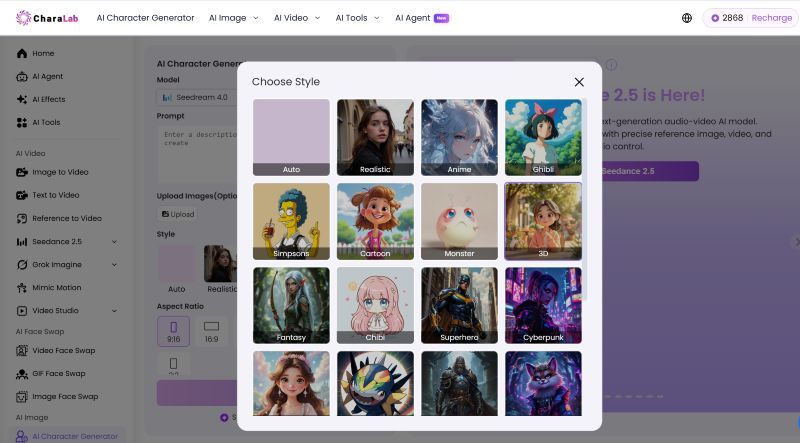
CharaLab's character generator covers 20+ styles, including Realistic, Anime, Cartoon, 3D, Fantasy, Superhero, Pokémon, and Ghibli Art. For most of mascot, the following styles can cover them all.
| Mascot Styles | ||
| Realistic | Anime | Ghibli |
| Simpsons | Cartoon | Monster |
| 3D | Fantasy | Chibi |
| Superhero | Cyberpunk | Disney |
| Pokemon | DnD Art | Furry Art |
| Villain | Pixel Art | Sailor Moon |
| NPC | Action Figure | |
Step4 - Set the Aspect Ratio for Intended Use
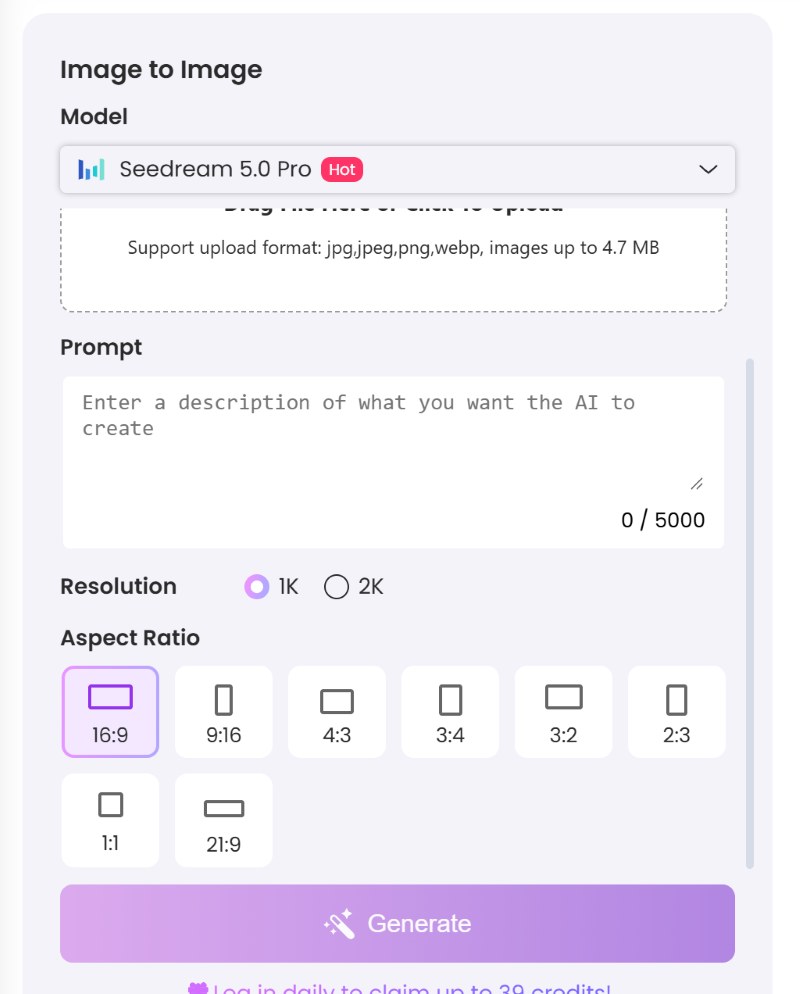
In CharaLab, the panel offers several ratios, with 16:9 as the default. Match the aspect ratio to the mascot size:
- Square: use this for profile pictures, app icons, stickers, emoji, and so on
- Wide: best for website headers, YouTube thumbnails, banner art, and presentation slides.
- Tall: ideal for posters, phone wallpapers, vertical social posts, and covers of Shorts.
Here are 2 practical tips: 1. If you want to add a wordmark next to the mascot later, leave space on one side instead of centering the mascot. 2. If you plan to print the mascot, create the largest frame possible and let the image enhancer handle the mascot's details.
Step5 - Generate, Review and Refine Your Mascot
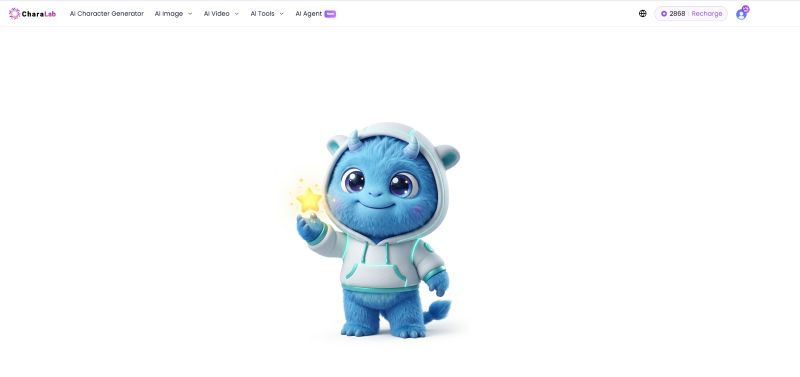
First, generate your work. Then, review it with a designer’s eye. Last, refine it if you have any problems with the outcome.
When you have a version you like, stop and save 2 things before you do anything else:
- The mascot prompt: save the exact text you entered in CharaLab's prompt box
- A character sheet with front, side, and back views, which you’ll need for merch, cosplay, or animation
After these, you can keep developing the mascot. You might adjust it for print sizes, make a short video clip, or add lip sync for a social greeting; do whatever you want.
Popular Mascot Characters
The 5 mascot types cover most of what people actually want. Each one has its own features; here's a brief introduction with their prompt you can refer to.
Mascot Logo
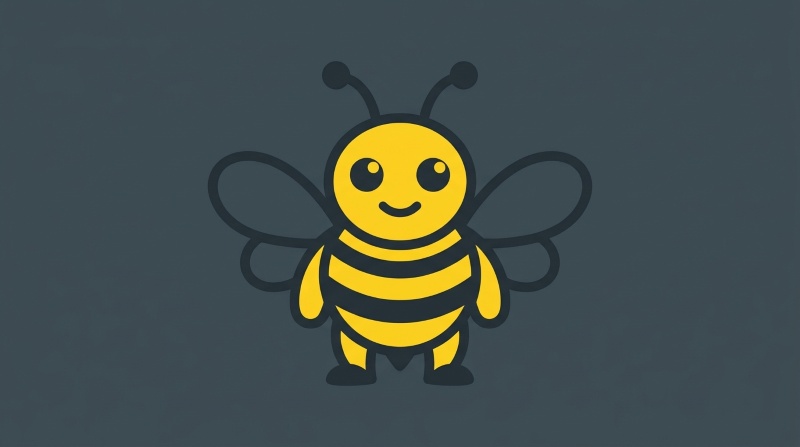
The mascot logo needs to look good at small sizes, sit well next to the text without conflict, and still be clear when printed in just one color.
Example prompt: "Simple flat mascot logo character: a rounded yellow bee with one pair of wings, thick black outlines, and only two colors: yellow and charcoal. The bee should face forward symmetrically, have a small smile, have no background, and have clean vector-style shapes. It should be designed to sit beside a wordmark."
Basketball Mascot
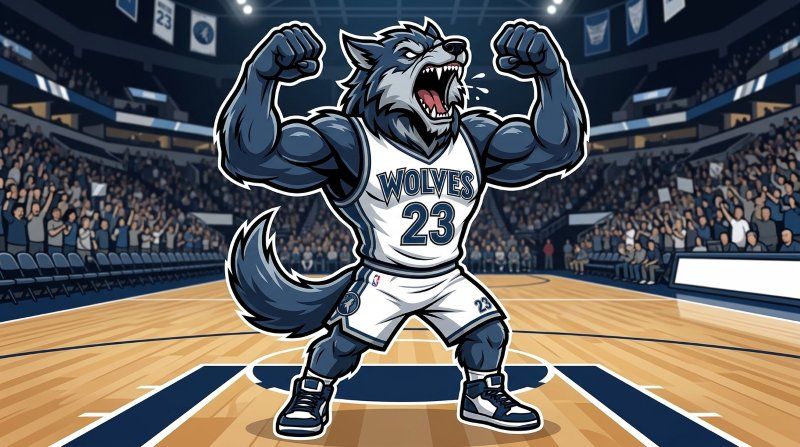
People see basketball mascots from far away in the arena. That’s why they use big shapes, lots of energy, and bold team colors, since small basketball mascots don’t shine.
Example prompt: "Create a basketball team mascot: a muscular cartoon wolf wearing a home white jersey with navy trim and the number 23. The wolf is mid-roar, both arms raised, showing energy and strength. Use team colors navy and silver, thick outlines, bold and readable shapes, and a clean arena-floor background. Apply flat cartoon shading."
Football Mascot
Football means two different sports depending on where your audience is, and each has its own mascot style:
- Soccer club mascots are usually friendly and rounded, which works well for families and children.
- American football mascots are often bigger and more aggressive, with helmets, shoulder pads, and a blockier look.
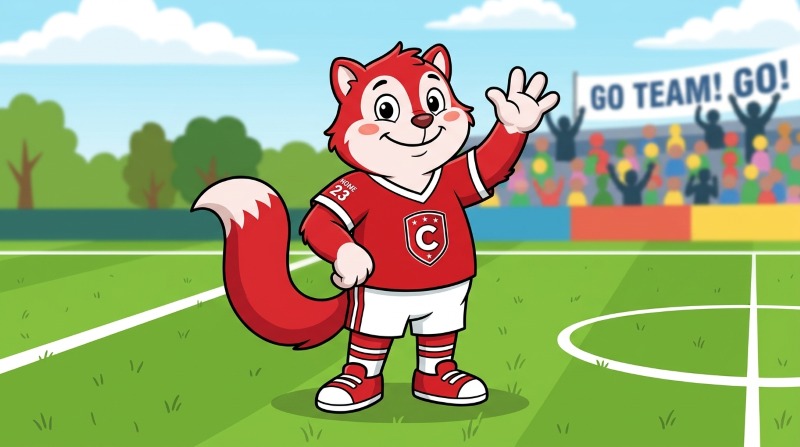
Example prompt (soccer): "A cheerful cartoon mascot dressed in a red home jersey and white shorts. The mascot waves with one paw, has soft friendly features, and shows the club's red and white colors. It stands on a green field with simple flat shading and bold, clear outlines."
Example prompt (American football): "American football mascot, wearing a helmet and shoulder pads in burnt orange and black. The bull has broad, heavy shoulders, a determined look, and raises one fist in a dramatic low-angle pose. Thick outlines make the figure stand out against a dark stadium background."
Animal Mascot
Animal mascot is the most common category, but it's also easy to get wrong. Animal isn't really a choice; it's more like a style. Pick the animal based on the trait you want people to see immediately.
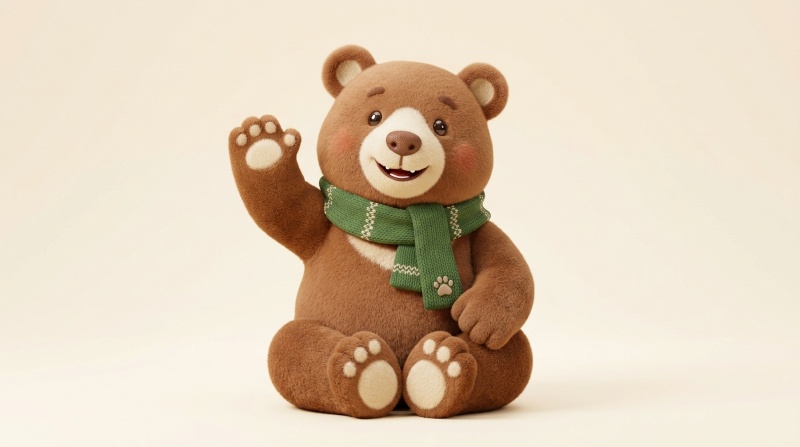
Example prompt: "Animal mascot, a friendly brown bear with a lighter muzzle, soft rounded shape, warm smile, brand colors forest green and cream, wearing a small green scarf, sitting and waving, gentle studio lighting, clean light background, semi-realistic 3D style, design suitable for merchandise"
Tips for Making a Good Mascot
Design it for one Purpose
Most weak mascots fail because they try to do everything at once. Choose the main purpose, like a 48-pixel profile picture, a T-shirt, or a website banner, and design for that first, then adjust.
A mascot made for an avatar has a big head and simple shapes; a mascot made for a T-shirt needs a clear body. Trying to make both perfect from the start.
Keep the Design Simple and Recognizable
If you fill your mascot with all black. Can you still tell what it is, and can you tell it apart from a similar character? If not, the design isn't distinct enough.
Limit yourself to three or four dominant shapes and three colors plus one accent. Then test it at big and small sizes. These will help make your mascot more distinctive.
Treating it as a One-time Project
This is the most common mistake, and it's expensive because the problem usually appears a year later. Teams generate one mascot, use it in one place, and when they need a holiday version, they start from scratch and get a different character.
To prevent this, you can save your important messages as we mentioned above in this article.
Maintain a Consistent Look Across Versions
Consistency is very hard to keep. When you need a new angle of one Mascot, start from the ready-made prompts that made your approved mascot and change just a few things.
FAQ
Can I Create an Online Mascot for Free?
Yes, CharaLab's character generator has a free tier. You can start creating a mascot right away without entering payment details, and your results are high definition with no watermark. If you need more credits, advanced features, or plan to use it heavily, there are paid plans available too.
Can Mascot Generators Create Customized Mascot?
Yes, customization is what it's all about. You can choose the species or object, set the proportions, and pick the expression, colors, outfit, props, pose, and art style. If the presets don't cover something, just add it to the prompt.
You can also upload a sketch or photo as a reference and have it recreated in your chosen style. This is the quickest way if you already have a rough idea on paper.
How Can I Keep My Mascot Consistent Across Different Images?
Save one main prompt as your way to keep a consistent Mascot. For every new asset, copy that prompt and change only one detail. When you need a new angle or pose, use the approved image as a reference instead of rewriting the description.
What Is the Difference Between a Mascot Generator and a Logo Maker?
A logo maker combines existing pictures, icons, fonts, and clip art into a design. It can't make a new character. A mascot generator makes original character art based on your description, so no one else gets the same image.
Can I Create Mascots for Different Sports?
Yes. The same generator works for basketball, soccer, American football, baseball, esports, and school athletics, but there are little differences among them.
Basketball mascots need big shapes and action poses; soccer mascots need a friendly, rounded character; American football mascots need broad shoulders and a squared shape; esports mascots usually want a more aggressive look.
Conclusion
One memorable mascot is very impressive. It can be recognized among many mascots. That's the goal for your first generation.
However, how can you realize it as a beginner? CharaLab will handles these in one place, including describe the mascot, pick a style, set the frame, create in HD without a watermark, then remove the background......Plus, It's totally friendly to all kinds of mascots.
Write one sentence about who your mascot is. Generate. Then keep it for your brand, company, communities, schools, sports team, and product.
 10 Best 3D Character Creator Tools in 2026(Reviewed & Ranked) >>Which is the best 3D character creator in 2026? Simply follow the comparison of 10 tools based on features and pros/cons, to find the right tool for your work. >>
 8 Best OC Generator for Consistent AI Characters (2026) >>Are you searching for the best OC generator? This guide compares the 8 best OC generators, which will help you choose the right one for your consistent OCs. >>
 6 Best DnD Character Creators from a Beginner's Perspective >>Looking for the best dnd character creator in 2026? This guide lists the 6 best creators for new users in DnD. >>
 8 Best AI Pet Portrait Generators for Pet Owners in 2026 >>Searching for the best AI pet portrait generator for your cute pet? Simply follow this guide to choose a dedicated pet portrait generator. >>
 7 Best Graffiti Generators for Creative Works in 2026 (Tested and Ranked) >>Discover the 7 best graffiti generators in 2026 to create graffiti art, logos, fonts, and tags. Compare tools and find the right one for your creative needs. >>
He is an experienced expert in AI character creation and has led the early design of many virtual character products. His step-by-step guides help creators build the AI character online from scratch. Here, he turns complex character prompts into different character styles, helping every human-machine collaboration get closer to the perfect character you imagine.