
- AI Image GeneratorAI Character
- AI Video Generator
- AI Image ToolsAI Video ToolsAI Face SwapOther Tools
 AI Image Generator
 AI Character
 AI Art
 AI Video Generator
 Other Tools
- AI Image Generator
- AI Art
- AI Video Generator
- AI Video Effects
- AI Image Tools
- AI Video Tools
- Other Tools
- Start Now

8 Best OC Generator for Consistent AI Characters (2026)
 SprakinsLast Updated: 2026/09/29
Are you struggle with searching for the best OC generator to keep your AI character consistent in 2026? Nowadays, AI image generation tools are everywhere. For OC creators, the main challenge is not just making appealing character images, but making sure an original character’s face stays consistent across different images.
Whether you’re working on a comic series, illustrating a novel, or designing game characters, keeping original characters consistent is key to professional-quality work. In this article, I review the 8 best OC (Original Character) generators to help you find tools that can really remember your original characters.
What Counts as an OC Generator?
A real OC (Original Character) generator does much more than just turn text into images. It needs several key features to stand out:
- Character memory: The tool should save important character details like facial features and hairstyle, and bring them back automatically when you generate the character again.
- Multi-angle generation: The generator should create different views of the same character, such as front, side, and back profiles.
- Character sheets: With one click, the tool should make professional reference sheets that show expressions, outfits, props, and other details.
- World-building and backstory support: Some tools can also help create an original character’s personality, backstory, and relationships with others.
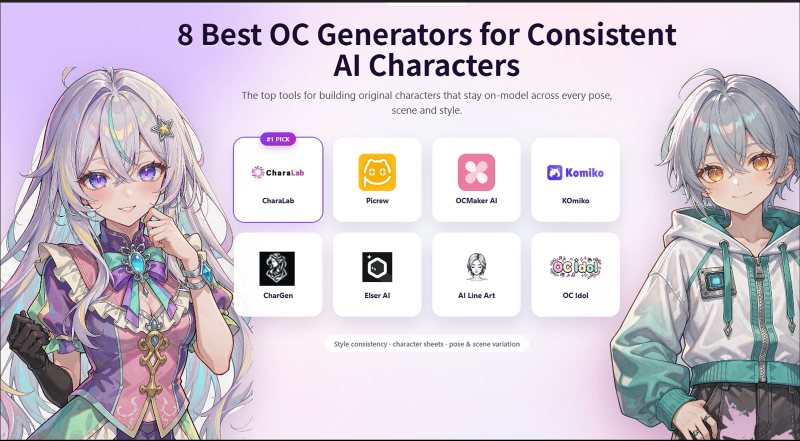
Most OC generators available today fit into three groups: visual-only generators like Picrew, tools that combine visuals and text such as CharaLab and KOmiko, and text-focused helpers like CharGen.
Why OC Generator Struggle with Character Consistency
OC generators' biggest problem is maintaining character consistency. Here are the three reasons consistency breaks down, and knowing them makes it much easier to pick the right tool.
1. No Persistent Original World
A generative model does not remember your character. Every image begins from scratch, with no character sheet or shared world for your original character to exist in. The face you see in the first image only exists there. This is why a character can look perfect in just one portrait.
2. Randomness in Generation
Randomness isn’t a problem; it’s what makes generative images look lively. But it needs limits. You can control it by using a fixed word, a strong reference image, a set style, or a character profile that the system uses again. If a tool doesn’t have these options, you’ll probably spend a lot of time regenerating images and settling for something that’s just close enough.
3. Limited Character Understanding
A model doesn’t see a person. It only sees tokens and patterns of pixels. That is why long prompts alone don’t fix consistency problems. Even with a detailed description, the character’s appearance might change each time, like having a different nose.
To solve this, some tools move the character’s details out of the prompt and into something you can reuse, such as a reference image, a saved design sheet, or a trained profile. This approach means the character’s identity doesn’t depend on the model understanding your words.
8 Best OC Generator for Keeping AI Character Consistency
The OC generators listed below are ranked by how well they keep a consistent character across different images, rather than by how impressive one result might be. This way, you can quickly compare them based on your own workflow.
1. CharaLab —— Best Overall OC Generator for Consistent Character
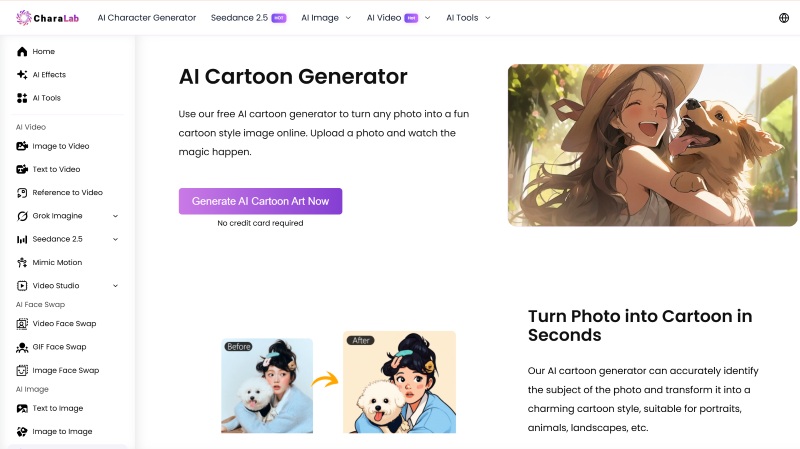
CharaLab is an overall AI character generator focused on original characters. You can describe your OC in text or upload a reference photo, and the AI character generator will create a character you can keep developing.
In CharaLab, you can try new poses, outfits, and scenes while keeping the same identity. Generation takes less than 10 seconds, supports 20+ artistic styles, and lets you use OCs in videos or edit them with built-in image tools.
Key Features
- Text/Reference to Character: You can start with a text prompt, a reference image, or a sketch of your original character
- 20+ OC Styles: Including anime, cartoon, stylized 3D, and so on.
- OC Design Sheets: OC character design sheets help you set proportions, outfits, and expressions before you create the final artwork.
- OC to Real Life: Allows you to use a library of video effects to bring your character to life in a short clip
- OC Face Sculpting: OC face sculpting lets you place your designed character into an existing shot or template
- Privacy Protection: All your output can be kept with 3days, and your upload would not leak your privacy
Pros
- The platform is truly end-to-end, letting you go from character creation to still images, videos, and cleanup all in one place
- You can start for free, and your generated OCs are totally free to use
- The wide range of styles lets you restyle your character without losing their unique features
- The platform clearly explains its policies on upload privacy and data retention
Cons
- Because the platform offers many features, the interface might feel crowded
- The quality of your results still depends on how good your reference image or description is
Pricing
- Daily free credits are available
- Pay as you go with a paid plan
Best for
- Creators who want one OC they can keep reusing
- Beginners of OC generation
- Game character designers
- Brand marketing
- Concept artists
2. Picrew —— Best OC Generator for Handmade-Style OC Creation
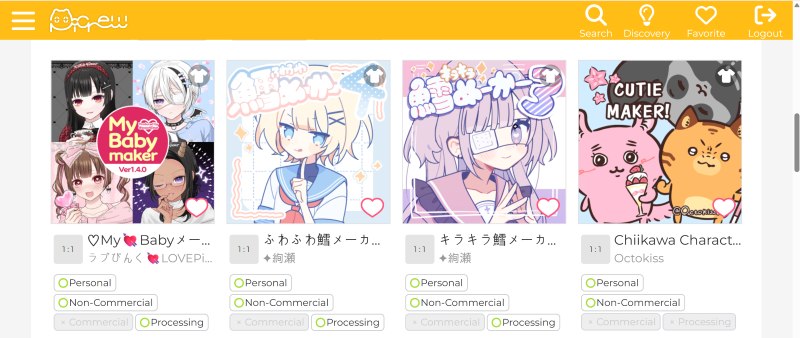
Picrew is not an AI OC generator, which is part of its charm. It’s a long-running platform where illustrators share their own image makers,modular character builders made from hand-drawn parts. You choose a maker and then pick hairstyles, eyes, outfits, and accessories.
You can play in two ways: dress-up mode lets you pick every part, while random mode chooses for you. The site has over 10,000 OC makers, from cute and stylish to intentionally eerie. It’s available in English, Japanese, and Korean, with iOS and Android apps.
Key Features
- 10,000+ OC Makers: Each with its own illustrator's style
- Dress-up Mode: Give you total control over your OC, or you can let luck decide with random mode
- Customize Each Part of OCs: Face, hair, outfit, accessories, and colors, and some makers let you adjust positions too
- Available in Web or Apps: You can use Picrew on the web or through mobile apps, making it easy to create characters on your phone
Pros
- The OC is truly hand-drawn, so your finished character looks like it was illustrated by a real artist
- Completely free to create and download, with no account required
- There’s no learning curve, which is perfect if you don’t know how to draw
- Each maker keeps everything consistent, since the parts and style always stay the same
Cons
- There’s no AI to assist
- You can’t use the OC in a different art style
- Usage rights are set by each maker; commercial use is never a given here.
- Plenty of makers, it can take some time to find one you really like.
Pricing
- Totally free for the web version
Best for
- Community managers
- Workshop hosts
- Illustrators
3. OCMaker AI —— Best OC Generator for Original Character Sheet
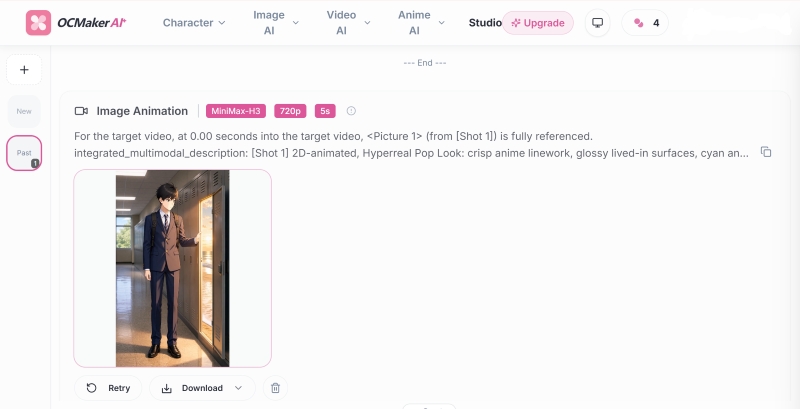
OCMaker AI is a studio focused on original character sheets. Its OC Creator lets you build characters from scratch in two ways: Builder mode, where you use structured controls, or Prompt mode, where you describe your idea in your own words. Both options give you a complete character with a silhouette, color palette, face ratio, hairstyle, outfit, and expression.
Consistent character mode keeps your character’s identity locked, so you can create new features of your OCs. The studio also offers AI image/video tools to support your OC creation.
Key Features
- Builder/Prompt Mode: Builder mode uses guided controls, while prompt mode lets you describe your OCs freely
- Style Presets: Including modern anime, realistic, Studio Ghibli-inspired, stylized 3D, chibi, cyberpunk, and watercolor options
- OC Details Control: Such as gender, age, hairstyle and hair color, skin tone, eye color, body type, outfit, accessories, pose, expression, framing, and lighting
- Lock Your OC’s Identity: Lock and create new outfits, poses, and scenes while keeping the same face and color palette
Pros
- It offers strong anime styling right away, with many more detail controls than a typical one-prompt tool
- Consistency is a main feature, not just a bonus
- Transparent PNG output makes it easy to create composites and merchandise mockups
- The included tools for video, pose, manga, and upscaling cover most needs for your OC project
Cons
- It is focused on anime, so it is not designed for photorealistic or painterly OCs
- With so many controls, it can take more time to set up before you get your first good image
- Many themed makers are inspired by existing franchises, which may not suit everyone looking for a truly original character
Pricing
- Start for free
- Basic plan: $8/mo
- Standard plan: $20/mo
- Pro plan: $72/mo
Best for
- Webcomic artists
- Visual novel fans
- Game developers
- Print-on-demand sellers
4. Komiko —— Best OC Generator for Consistent Anime Character
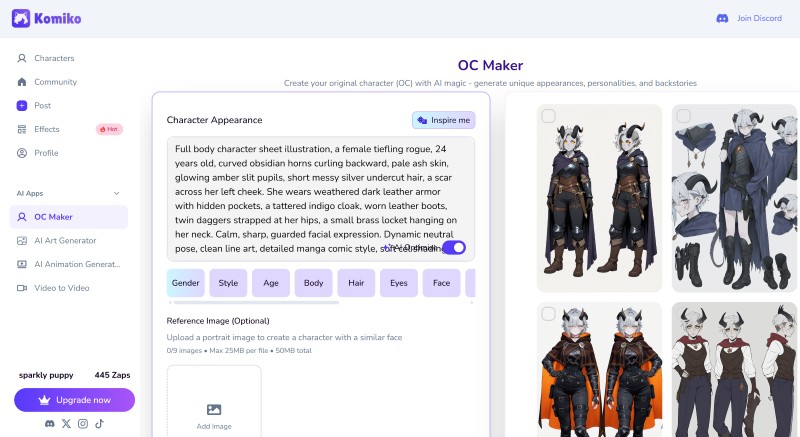
Komiko is an anime creation studio that puts character design first. Its OC Maker and OC Creator tools let you design original characters and reuse them in illustrations, comic panels, and animations. Instead of relying on one long prompt, Komiko uses structured references like character details, action, and more.
You can also use several reference images to keep your character consistent. Komiko includes a comics canvas, an AI comic generator, and an image playground that can turn OCs into a serialized comic book.
Key Features
- OC Maker and OC Creator: For designing, storing, and reusing original characters
- Structured Prompt References: More ways to generate OCs, instead of relying only on complex prompts
- Comics Canvas: Fixed manga and webtoon panels with consistent character art
- Video and Animation Tools: Allow you to animate keyframes, use in-betweening, apply frame interpolation, and upscale videos
- Zap Credit System: It offers daily login bonuses
Pros
- The consistency tooling exists for serialized work, not just single images
- Comic → illustration → animation pipeline in one workspace
- Works on web and mobile, with a community feed for inspiration
- Free Zaps let you test the suite before paying anything
Cons
- All features use Zaps, and creating videos uses up your monthly allowance much faster than images
- Subscription Zaps reset every month instead of carrying over unused credits
- Output and consistency still vary by the model you pick and how you prompt
- Paid access might be limited
Pricing
- New users get 500 free Zaps at signup, plus daily bonuses (80 Zaps daily)
- Starter plan: $9.99/mo
- Plus plan: $19.99/mo
- Premium plan: $49.99/mo
- Custom plan for enterprise
Save about 17% with annual billing.
Best for
- Manga creators
- Storyboard tellers
- Indie animators
- Illustrators running a character IP
5. CharGen —— Best OC Generator for Backstory & Worldbuilding
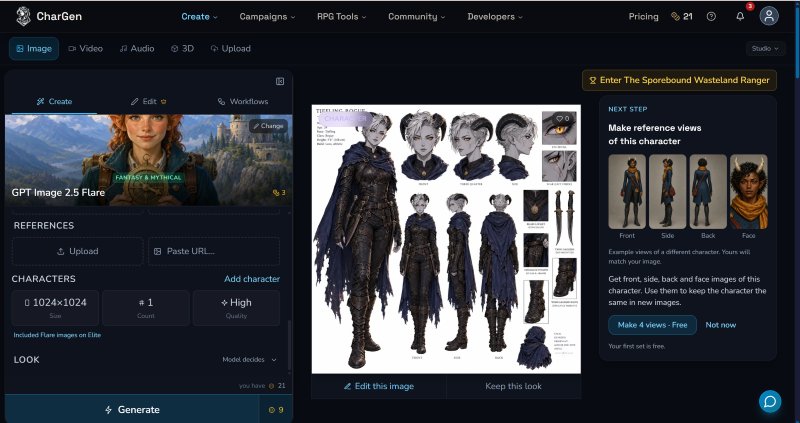
CharGen is an AI toolkit designed for OC worldbuilding, and it stands out as the most text-focused tool here. Its Workshop connects 24 different generators, including names, NPCs, species, classes, taverns, settlements, regions, worlds, dungeons, quests, monsters, factions, pantheons, magic items, and more.
Everything you create is linked in a world, so NPCs know their faction and region. The cost is shown before you generate. You can also upload a character sheet as a PDF, a D&D Beyond link, or a photo of your paper sheet to get a portrait that matches the listed race, class, and gear.
Key Features
- 24 Text Generators: Plus a World Codex that links every entity into campaigns and arcs
- Sheet to Art: Lets you upload an image, it reads the race, class, gear, and any margin notes
- Character References: Allow you to save a portrait as a reference and reuse it on the Generate page and in videos
- Session Tools: Record your session and create recaps and storyboards with speaker names
- Easily Get the Art: No complicated instructions. You choose the scene. The studio creates it
- Consistent OC in Every Scene: Save a portrait as a Character Reference to keep it consistent
Pros
- All text generation is free and unlimited for every account.
- Sheet-to-art is a truly helpful shortcut for creating tabletop characters.
- You can use much of the toolkit for free
- 160+ Image Models and 70 Art Styles
- iPhone app supported
Cons
- It is designed mainly for tabletop RPGs, so it may not be the best choice if your original character is not part of a campaign
- Gold credits can run out quickly
- Free and Plus images are for personal use only
- Free accounts include only one Character Reference with three images
Pricing
There are 2 pricing plans:
For membership:
- Get started for free
- Plus plan: £8 per month
- For power users: £16 per month
- For professional creators: £32 per month
For gold packs:
- Starter pack costs £5.99 per month (300 gold/month)
- Popular choice is £14.99 per month (900 gold/month)
- Best value plan is £29.99 per month(2000 gold/month)
- For big studio, £59.99 per month (4500 gold/month) is more suitable
You save 20% with annual billing.
Best for
- Dungeon masters
- TTRPG writers
- Adventure designers
- Narrative designers
6. Elser AI —— Best OC Generator for Turning Prompts into Fantasy Character
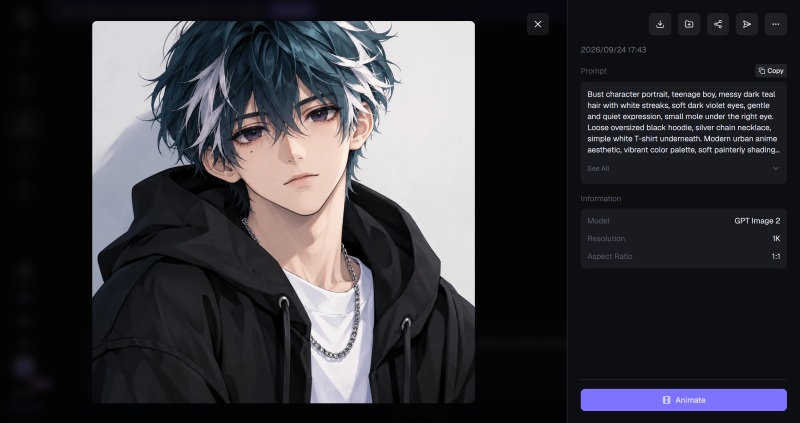
Elser AI is a studio-grade AI fantasy character generator that also works as an OC maker. You can upload an image or describe an idea, and it will create fantasy-style visuals. The same character can appear in a full fantasy short, staying consistent across different scenes.
The platform does not only character creation, it also supports an AI storyboard agent, sound effects, and voice cloning. Its built-in Templates include popular OC types.
Key Features
- OC maker: With consistent characters held across multiple scenes
- AI Storyboard Agent: Helps you go from script to shot list
- 200+ Templates and 40+ Creation Tools: Including fantasy, chibi and wizard OC templates.
- Elser Studio: A local-first desktop workspace for longer-form projects.
Pros
- You can create a full production chain
- The large template library makes it much faster to create fantasy OCs
- You are allowed to use your creations for commercial purposes
- There is a free plan so you can try out the main tools before committing
Cons
- The platform is focused on fantasy styles, so it is less suitable for realistic or painterly original characters
- Multiple AI tools; it can take some time to learn how to use everything.
Pricing
- Free tier: 50 credits for beginners
- Basic tier: $9/mo
- Pro tier: $22.9/mo
- Ultimate tier: $32.9/mo
- For creator: $79.9/mo
Best for
- Anime studios
- Fantasy novelists
- Commercial content publishers
7. AI Line Art —— Best OC Generator for Line Art Characters
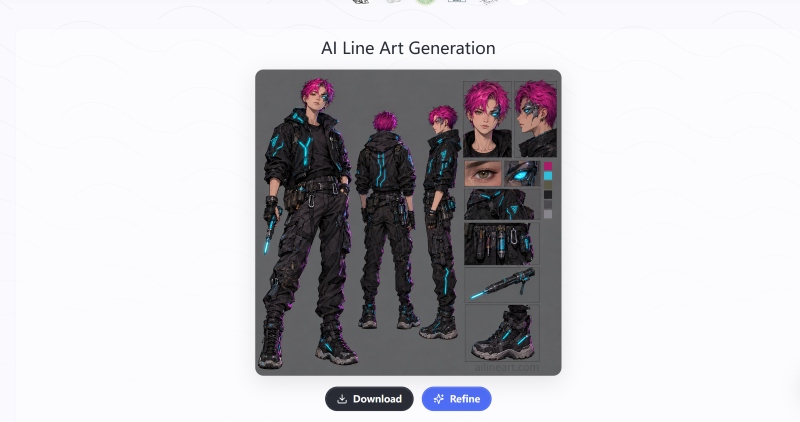
AI Line Art focuses on one task: you upload a photo or enter a prompt, and it gives you line art of your OCs. This is especially helpful if you want to turn a finished portrait of your character into clean outlines for a comic panel or printable.
You can choose from styles like sketch, pencil, woodcut, watercolor, and minimalist. You can also guide the result with a prompt and adjust things like aspect ratio, composition, and lighting.
Key Features
- One-click OC-to-Line-Art: No tracing, no manual cleanup required for your OCs' line art
- Prompt Supported: Steer the conversion with prompts, plus advanced settings for aspect ratio, composition, lighting, and speed
- Multiple Styles: sketch, pencil, woodcut, watercolor, and minimalist
- High-resolution Export: you can export with higher resolution for print
- Various Export Format: PNG, JPG, WEBP, and SVG output on higher tiers
Pros
- It’s very easy to use: just upload, click, and download.
- Suitable for creating coloring pages and printables
- Faster results
- Free entry point
Cons
- It doesn’t remember characters, just simply draws whatever image you given
- It cannot design an original character
- You’ll need a subscription for each OC
Pricing
- You can choose to pay yearly:
- Basic plan: $5.99/mo for 100 OCs
- Pro plan: $17.99/mo for 500 OCs
- Business plan: $59.99/mo for 2000 OCs
Best for
- Tattoo designers
- Art teachers & educators
8. OC Idol —— Best OC Generator for OC Name
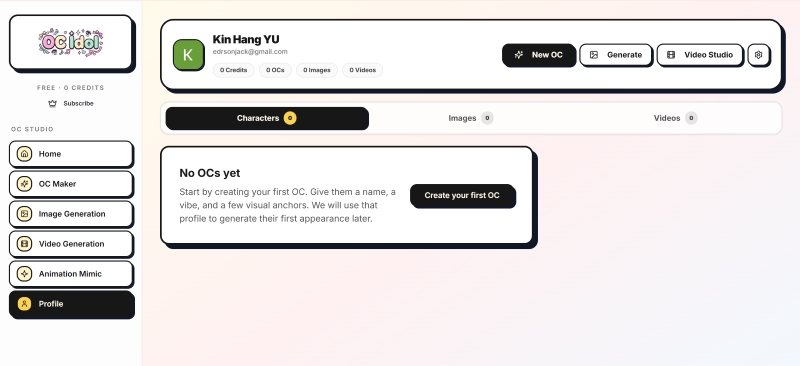
OC Idol is a dedicated OC name generator with added images. Start by creating a detailed character profile, including name, personality, backstory, and visual anchors. Then, the AI Image Lab helps you make consistent images of your character in different poses, outfits, and moods.
Each image is saved in a character-organized gallery. Consistency tools use visual anchors, tags, and reusable prompts to keep your character's look steady. The platform also offers themed makers for cyberpunk, school, anime avatar, 3D, and realistic OCs.
Key Features
- Character Profile Creation: Lets you build structured OC profiles
- Consistency Tools: Visual anchors to keep the OC stable.
- Personal OC Gallery: Every version stored in your OC gallery
- Text Tool Set: OC name, traits, and so on, plus a character sheet template and tier list maker
- Themed OC Makers: Various OC styles
Pros
- OC Idol is made for original characters with profiles
- Character galleries designed for keeping long-term assets
- Visual anchors and tags help keep your character's look consistent
- The toolkit is helpful if you are starting from scratch
- You can browse a community gallery of real OCs for inspiration
Cons
- OC Idol is smaller and newer than some bigger studios
- The starting allowance may feel limited if you want to create many versions
- Whether you can use images commercially depends on the model terms you selected
Pricing
- Free plan gives 5 OC profile
- Plus plan gives you 30 OC profiles
- Ultra plan gives you unlimited OC profiles
- You can also buy one-time credit packs at any time.
Credits from packs never expire, but subscription credits are renewed each month.
Best for
- OC artists
- Commission illustrators
- VTubers
- Persona builders
- Fanfiction
- Roleplay writers
The 8 Best OC Generator Comparison At a Glance
Here is a comparison of the eight tools. It shows all the main features of each tool, who they are best for, whether they keep OCs consistent, and if they are suitable for commercial use.
| Tool | Core Featues | Best For | Consistent OCs | Commercially Use |
| CharaLab | 20+ OC art stylesOC tool suite | OC creatorsBeginnersBrand marketing | Yes | √ |
| Picrew | Customize each part of OCs | Community managersWorkshop hosts | No | × |
| OCMaker AI | Two different OC creation mode | Webcomic artistsVisual novel fansGame developersPrint-on-demand sellers | Yes | √ |
| KOmiko | Comics Canvas for OCs | Manga creatorsStoryboard tellersIndie animators | Yes | √ |
| CharGen | OCs' worldbuilding | Dungeon mastersTTRPG writersAdventure designers | Yes | × |
| Elser AI | Fantasy original character | Anime studiosFantasy novelists Commercial content publishers | Yes | √ |
| AI Line Art | Line art of your OCs | Tattoo designersArt teachers & educators | No | √ |
| OC Idol | Character profile creation | OC artists Commission illustrators VTubers Persona builders | Yes | × |
How to Choose the Best AI OC Generator?
With eight options to choose from, focus on the following five key questions. Answer them one by one, and the best choices will become clear.
1.Prioritize Consistent Character Generation
Consistency is the one feature you really need. A tool with fewer styles that keeps your character's face the same is better than one with many styles that changes the design each time. When you check out a platform, focus on how it works, not just what it promises.
You can run a quick test for free. Try generating the same character in three different scenes: indoors, outdoors, and a close-up. Then compare the faces. If they all look like the same person, the tool is truly consistent.
2. Check Supported OC Types
Not every OC generator is good at every character type. Human, anime, fantasy, cartoon, and stylized 3D characters all need different things from a generator, and most platforms excel at only one.
If your OC is an anime character, an anime-focused tool will work better than a general one. If your OC is a fantasy adventurer with detailed armor, a tool focused on that genre will handle the costume more easily.
3. AI-Generated OC Copyright Rules
If your OC will appear in published work, like a webcomic, printed book, monetized video, or a social account you want to grow, read the licensing terms before you commit. There are three things you should check:
- Who owns the output, and whether you are granted commercial use on the free tier or only on a paid one
- Whether you can register or defend the character as your own work
- Whether the platform reserves any rights to reuse, display, or train on what you upload
Terms can be very different between free and paid versions, and they may change over time.
4. Consider Pricing for Each OC Generator
OC generators have very different pricing models, and the lowest price is not always the best deal. Pay attention to how the pricing works, not just the number:
- Free with daily credit
- Subscription tiers
- Pay-per-generation
- Free but limited output
Try to estimate how many OCs you will need for your project. Making one consistent character for a series usually takes hundreds of images, not just ten.
5. Extra Features: OC's Ideas, Color and Background
After you have consistency, the other features make the generator easier and more enjoyable to use. The most helpful ones are:
- Idea and concept support
- Color control
- Background and scene options
- Export formats
- Batch generation
FAQ
What Does OC Generator Mean?
An OC generator is a tool that helps you create an original character, meaning one you came up with instead of using someone from an existing template.
The best generators let you save your character and reuse them, so you can put the same person in different poses, outfits, and scenes.
What Makes an OC Good?
A good OC feels like a real person, not just a prompt. This comes down to three things.
- First, the design should be clear and memorable, with a unique shape, a consistent color, and one or two details you would notice right away.
- Second, the character needs a personality, a backstory, and reasons for what they do.
- Third, you should be able to recreate the OC the same way each time. If you can't, it's hard to use them in a story, which is why consistency tools are important.
Can I Make an OC If I Cannot Draw?
Yes, you can. Not being able to draw is less of a problem than ever. You can describe your character in words or upload a photo, and let an AI generator like CharaLab create the design.
The important part is your ideas: who the character is, what they want, and what makes them stand out. Drawing is a skill, but creating a character is your choice, no matter how you do it.
How to Keep the Same OC Consistent with AI Character Generator?
To keep your OC consistent, start by giving the tool a clear definition of your character instead of starting from scratch each time. The best way is to make a reference image or design sheet you like, and use it as your main guide for every new version.
How Do I Make My OC in CharaLab?
The process is deliberately short. First, describe your character in text, or upload a reference photo or sketch, and pick an art style from the options. CharaLab will create your character from there.
Next, review the result and adjust key details like hair, eye color, outfit, and any special features. When you are happy with the design, save it as your character's final profile.
Conclusion
Original Character consistency means being able to use a character for more than just a single drawing. Each tool listed above helps with part of that process. Picrew lets you quickly create an illustrated base, OCMaker AI turns your design into a model sheet, and Komiko keeps anime faces looking the same across a series. CharGen and Elser AI help you develop the world and the character’s archetype; AI Line Art gets your character ready for line art, and OC Idol helps you pick a name before anything else.
If you want everything in one place, CharaLab is the best choice on this list. You can use a text description or a reference photo, and it will generate your OC in more than 20 art styles. CharaLab keeps the original character design consistent, so your character always looks the same in different scenarios or videos. Once your OC fixed, every character after that will still look like them.
He is an experienced expert in AI character creation and has led the early design of many virtual character products. His step-by-step guides help creators build the AI character online from scratch. Here, he turns complex character prompts into different character styles, helping every human-machine collaboration get closer to the perfect character you imagine.