
- AI Image GeneratorAI Character
- AI Video Generator
- AI Image ToolsAI Video ToolsAI Face SwapOther Tools
 AI Image Generator
 AI Character
 AI Art
 AI Video Generator
 Other Tools
- AI Image Generator
- AI Art
- AI Video Generator
- AI Video Effects
- AI Image Tools
- AI Video Tools
- Other Tools
- Start Now
8 Best AI Pet Portrait Generators for Pet Owners in 2026
 SprakinsLast Updated: 2026/10/14
In 2026, is it possible to use an AI pet portrait generator to quickly turn your pet’s photo into a watercolor painting or a royal portrait? The answer depends on various factors.
With so many generators available, it can be hard to choose the right one. There are free and paid options, general platforms and pet-focused apps, and choices between still images or animated videos.
The main question now is not whether these tools exist, but which one fits your pet, your needs, and your budget. This guide will start with the basics, explain why AI pet portraits matter to animal lovers, review 8 popular tools, and offer a guide to help you pick the best AI pet portrait generator for your own.
What is an AI Pet Portrait Generator?
An AI pet portrait generator is a tool that uses AI to create a digital portrait of your pet from a photo or text prompts. Most generators work in three steps:
- Upload a clear reference photo of the pet.
- Choose or describe an art style (oil painting, royal, cartoon, anime, watercolor, and so on).
- Generate, preview, and download a high-resolution image.
Some advanced generators also support text-to-image creation, group portraits, background removal, and even video animation. The result is a digital pet portrait that can be used for social posts, gifts, merchandise, memorial keepsakes, or brand assets.
Why AI Pet Portrait Generator Means a Lot to Animal Enthusiasts?
1. Want to Have a Virtual Pet
Many people can‘t have real pets because of their living situation, allergies, or busy schedules. AI pet portrait generators give them a way to have a virtual pet. By uploading a photo of a favorite animal, users can create fun portraits in different settings, which helps meet their need for emotional companionship.
2. Honor a Pet Who Has Passed Away
If you have lost a beloved pet, AI portrait generators can help you create a lasting memory. Some genertaors are made for remembering pets after they are gone. They can learn your pet’s features and personality to create images that look like your pet is still with you. You can also print these portraits on canvas or as a souvenir to have a permanent reminder.
3. Favor All Kinds of Animals
Animal lovers often care about more than just cats and dogs. AI portrait generators can create portraits of many different animals, so users can make unique images of any pet they love, like a rabbit, bird, or horse. Love for pets goes beyond species.
4. Digital pets are very popular right now
Digital pet content has become a big part of pop culture on social media. People are willing to share their pets on Instagram and TikTok. This lets them show off their creativity and connect with others. Generators can even turn pet photos into lively videos that make pets dance or talk, these kinds of posts are very popular online.
8 Best AI Pet Portrait Generator Online Free
1.CharaLab - Best Pet Portrait Generator for Your Own Pet
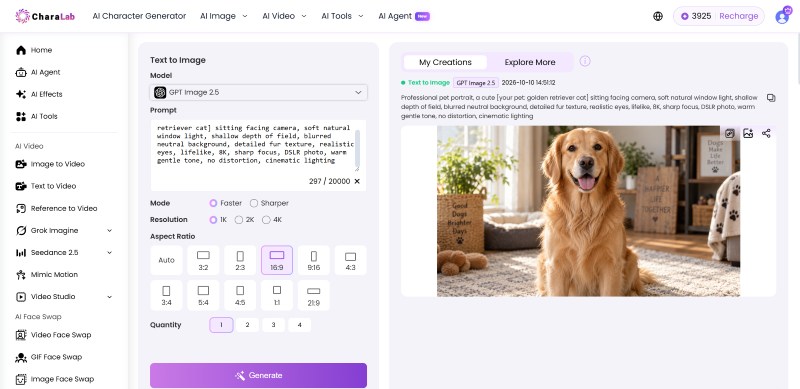
CharaLab is an general AI tool that creates portraits of your own pet. It works for cats, dogs, rabbits, birds, and other common pets, users upload a photo and choose from over 20 styles, like anime, 3D, realistic, fantasy, superhero, Pokémon, or Ghibli. Then, You’ll see a customized portrait of your pet appear.
In CharaLab, whether you want pet avatars, videos for social media, or custom gifts, CharaLab helps you do it easily. You can try out different styles and quickly make several versions of your pet’s portrait.
Tips: For the best results, use a clear photo; this will be helpful to preserve your pet's color, eyes, and facial features.
Key Strengths
- MuLtiple Pet Styles: 20+ art styles in one studio, feel free to choose from the pet style library
- Text to Pet Portrait: You can create a pet portrait from text even if you don't have a reference photo
- Built-in AI Tools for Pet Art: It offers background/watermark removal for pet stickers, image expansion for prints, and photo restoration for old pet photos
- Pet Image to Video: Bring your still pet photo to real life
- AI Effect: Let your pet dance and talk to bring a smile to your face
Advantages
- Fast image generation, often well under 30s per portrait
- Integrated functions in one platform without needing to switch between separate tools
- Free export selection, which matters for some beginners
- There are more options available, not just pet portraits
Weaknesses
- CharaLab is a general-purpose generator, not a pet-only tool
- The wide range of models and styles can feel overwhelming on the first visit
Pricing Plan
- Free trial is available
- Pay-as-you-go according to your plan
Best for
- Pet content creators
- Print-on-demand sellers
- Custom gift designers
- Indie game developers
- Visual storytellers
2. Adobe Firefly - Best Free Pet Portrait Generator
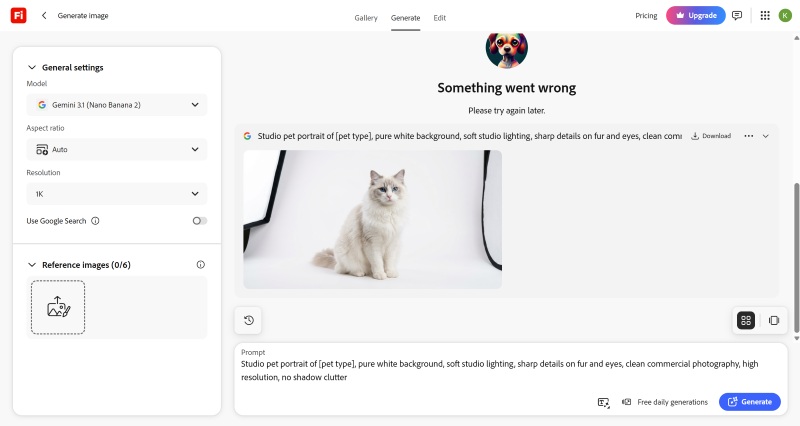
Adobe Firefly is a generative AI tool from Adobe that offers a free pet portrait generation feature. Different from CharaLab, Adobe Firefly also supports royal styles of pet portraits.
One of Firefly's main benefits is its support for text-based inpainting, which lets users edit specific parts of their pet photo. After creating a pet portrait, users can adjust details like ear shapes and eye scale. This helps solve the problem of limited control in many automated tools.
The feature is especially useful for anyone who needs detailed adjustments. However, if you want to use generated content for commercial purposes, you will need a paid plan.
Key Strengths
- Group Pet Photo Support: Several pets can share one stylized portrait with a unified style and theme
- Detailed Style Controls: Including composition, visual intensity, effects, color and tone, lighting, and camera angle
- Adobe Ecosystem: with the option to bring portraits into Photoshop or Illustrator for further editing
- Preset Style Library: covering cartoon, anime, watercolor, sketch, fantasy, realism, and royal looks for digital pet portraits
Advantages
- Free daily generations with just an Adobe account
- Outputs are designed to be commercially safe
- Broad species coverage plus multi-pet group portraits
- Seamless hand-off to the rest of the Adobe creative ecosystem
Weaknesses
- Free accounts have daily generation limits; heavy users need a paid plan.
- Outputs can look generic unless you spend time tuning prompts.
Pricing Plan
- Standard Plan: $9.99/mo
- Pro Plan: $19.99/mo
- Pro Plus Plan: $34.97/mo
- Premium Plan: $139.91/mo
Best for
- Graphic designers
- Creative professionals
- Marketing teams
3. DreamPets - Best Pet Portrait Generator for Renaissance Styles
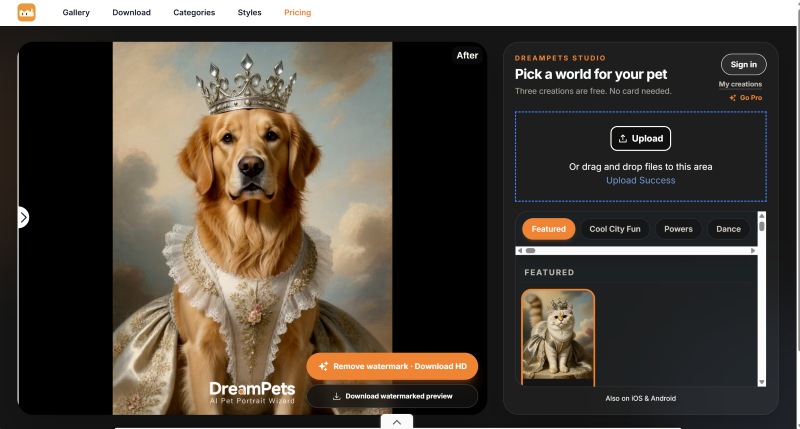
DreamPets is an app made for pet lovers. Its AI is built specifically for Renaissance styles, so it can capture their coat colors and unique features to create portrait that closely resemble the real animals.
It has over 200 pet portrait styles to choose from. Mix and match outfits and backgrounds, or use your own text prompts to create something unique. Popular styles include classic oil paintings, royal portraits, Disney-inspired looks, and watercolors.
Key Strengths
- Renaissance Styles: This tool focuses on different aspects of the Pet Renaissance.
- Pet-optimized AI Model: It was designed to capture fur color, markings, and facial features.
- Various Pet styles: It has plenty of pet styles to choose on the web, with a much larger library inside the app.
- Before-and-after Comparison: You can compare the difference to judge likeness before saving.
- Supports Still Image: Static portraits, avatars, and short animated videos are supported
Advantages
- Purpose-built for pets
- Many occasions make it simple to match birthdays, holidays, and memorials
- Comparing images, lowers the risk of a ruined pet portrait
- A mobile-first workflow works well for creators
Weaknesses
- The web version exposes only a limited style set; most styles require the mobile app
- Some users report app stability issues
Pricing Plan
- Paid monthly: $9.99/mo
- Paid by year: $29.99/yr
- One-time paid plan: $59.99
Best for
- Mobile-first pet influencers
- Pet store owners
- Pet brand marketers
- Pet memorial keepsake makers
4. Vofy - Best Pet Portrait Generator for Printable Stuffed Pet
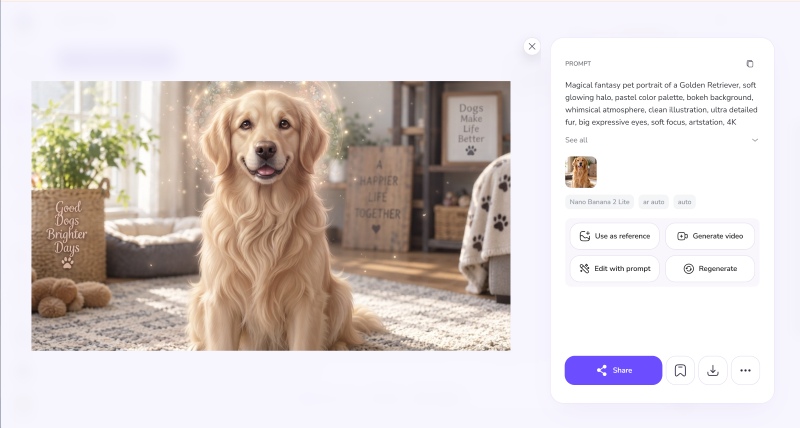
Vofy is an AI tool that helps you create printable stuffed artwork. Its classic pet portrait feature is set up for high-quality prints, and you can choose styles like watercolor, oil painting, or soft illustration. Plus, Vofy gives you a free trial of the pet portrait feature, so you can try it out right away without setting up a custom workflow.
Besides making portraits, Vofy lets you turn photos into different styles like line art, vector graphics, and charcoal sketches. You can use these images as profile pictures, artist banners, printable gifts, or pet portraits. It can also print your portraits directly onto canvas.
Key Strengths
- Suitable for Stuffed Pet: You can print a stuffed animal through Vofy
- Four Dedicated Pet Portrait Presets: Classic Pet Portrait, Royal Pet Portrait, Cartoon Pet Avatar, and Memorial Keepsake
- Likeness-first Processing: It can preserve the pet’s eyes, coat markings, pose, and collar details from the uploaded photo
- Output Oriented: You can use the portrait as framed prints, canvas mockups, gift portraits, profile covers, and tribute prints
- Easy Three-step Workflow: upload a pet photo, pick the portrait style, then create
Advantages
- Clear structure makes it easy to pick the right portrait
- Without a text prompt, you can also do a great pet portrait
- Free to use with a straightforward workflow
Weaknesses
- Fewer controls than prompt-based tools
- Final print quality depends heavily on the resolution of the uploaded photo
Pricing Plan
- 30 free credits are available per month
- For a starter: $9/mo
- For a Pro plan: $19/mo
- For a Max plan: $69/mo
- For a Max+ plan: $148/mo
Best for
- Etsy sellers
- Home decor marketers
5. Kling AI - Best Pet Portrait Generator for Royal Style
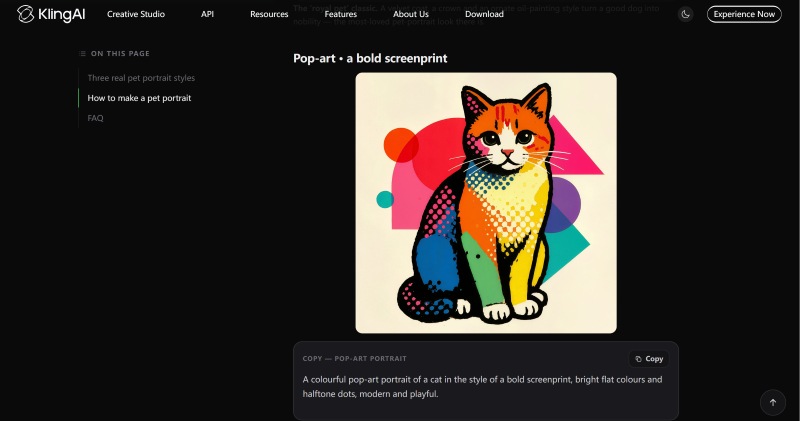
Kling AI is great at making royal-style pet portraits. As we all know, Kling AI is primarily known as a generative image and video platform, and its pet portrait workflow is based on text-to-image prompts. So, the most popular styles are dramatic royal portraits
Because the tool is prompt-driven, users must have full control over costume, background, lighting, and framing. It also offers an image-to-video feature that can transform pet portraits into dynamic video content.
Key strengths
- Royal Pet Styles: There are many styles, but Royal styles are quite popular
- Reference-based Creation: Use clear pet photo or structured prompts, and it can truly captures your pet’s unique features
- Diverse Pet Style Options: Choose from a variety of styles to create a pet portrait that is special for you
- Pet Customization: You can customize details like clothing, backgrounds, and props to make the portrait just right
- Composition Control: Turn your traditional pet portrait into art-quality
- High-resolution Output: Supports exports up to 4K quality, so you don't have to worry about blurry results.
Advantages
- Excellent for dramatic royal pet portraits
- Prompt-driven control gives artists more controls
- Works with any pet
- Extremely high generation rate
Weaknesses
- No dedicated pet-portrait interface
- Success depends on your prompts
- Results vary if the reference photo is blurry
Pricing Plan
Paid by month:
- Standard Plan: $6.99/1st mo
- Pro Plan: $25.99/1st mo
- Premier Plan: $64.99/1st mo
- Ultra Plan:: $6.99/1st mo
Paid by year:
- Standard Plan: $79.2/yr
- Pro Plan: $293.04/yr
- Premier Plan: $728.64/yr
- Ultra Plan: $1429.99/yr
Best for
- Digital artists and illustrators
- Creative directors
- Content creators
- Gift retailers
6. Kaze AI - Best Pet Portrait Generator for Preserving Memories
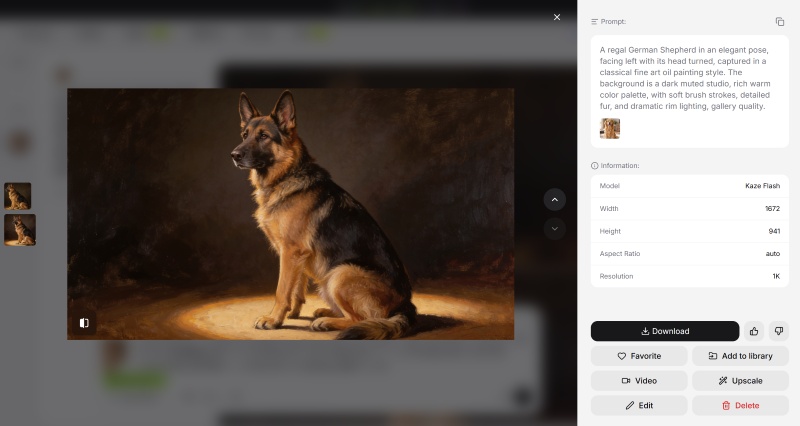
Kaze AI helps you preserve memories with your pet by restoring and enhancing photos. It uses advanced AI to recover missing textures, reduce pixelation, and bring back real details. It's a great option for fixing old, blurry, or damaged pet photos.
With Kaze AI, you can digitize, restore, and enhance your pets' vintage photos, giving new life to your cherished memories.
Key Strengths
- Memorable Assets: A passed-away pet can live forever in your pet portrait
- Multiple Pets Support: There is no limit to your pet type
- A Clean Web Page Display: Clearer page results and more concise content.
- Privacy-first Protection: Uploaded pet photos are never stored or shared, and portraits are generated securely
- Smoother Workflow: From upload to download, with no software installation
Advantages
- Print-ready results suited to memorial pieces
- Broad animal coverage beyond dogs and cats
- Free access with a simple workflow
Weaknesses
- Style library is relatively limited compared to other tools
- Commercial licensing on free outputs is not clearly stated
Pricing Plan
- Pro plan: $4.95/mo for 120 credits
- Pro+ plan: $9.95/mo for 300 credits
- Max plan: $29.95/mo for 1000 credits
- Ultra plan: $89.95/mo for 2700 credits
Best for
- Pet memorial keepsake makers
- Custom gift shop owners
- Pet bloggers
7. PicLumen - Best Pet Portrait Generator with Pet Portrait Template
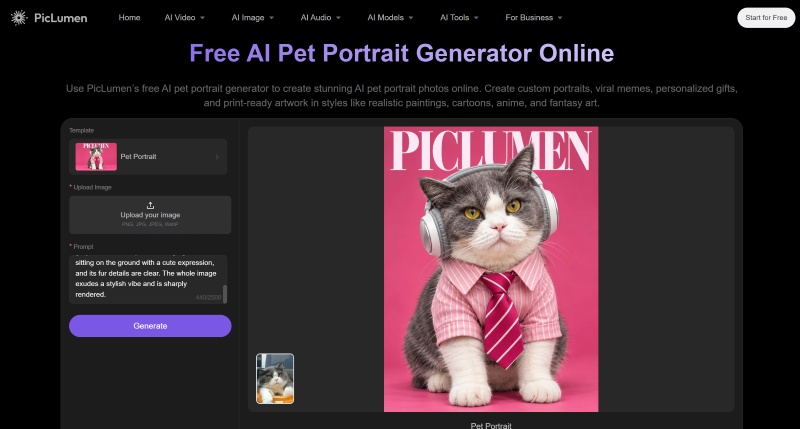
PicLumen is an AI creative studio with a dedicated AI pet portrait generator built around a Pet Portrait template. In PicLumen, you can turn your pet photos into funny memes, popular characters, and content everyone wants to share using its built-in AI tools.
Imagine your pet as a superhero, celebrity, medieval knight, or famous internet meme with a simple prompt. Make unique images that grab attention on Instagram, TikTok, Reddit, or in your group chats, and all of these without needing special editing skills.
Key Strengths
- Dedicated Pet Portrait Template: upload a pet photo and pair it with a custom prompt in a single generation
- Photo-to-art: restyling into watercolor paintings, oil portraits, anime characters, cartoons, fantasy illustrations, or realistic digital artwork
- Pet Meme Creation: It can reimagine a pet as a superhero, celebrity, medieval knight, or trending internet meme
- Prompt-level Customization: including AI model choice, aspect ratio, and image quality, to steer the final pet portrait
Advantages
- A special pet portrait template makes the process clear
- High 4K quality lets you make large prints and products without losing detail
- Free tier lets you test pet portraits before committing to a paid plan
Weaknesses
- Free-plan results have a watermark
- Full commercial licensing is reserved for higher-paid tiers
- How much it looks like the pet depends a lot on how clear the uploaded photo is and how good the prompt is
Pricing Plan
- Lite Plan: $6.09/mo
- Standard Plan: $19.99/mo
- Pro Plan: $37.49/mo
- Elite Plan: $269.99/mo
Best for
- Pet business owners
- Pet designers and illustrators
8. FLUX AI - Best Pet Portrait Generator for Custom Photos
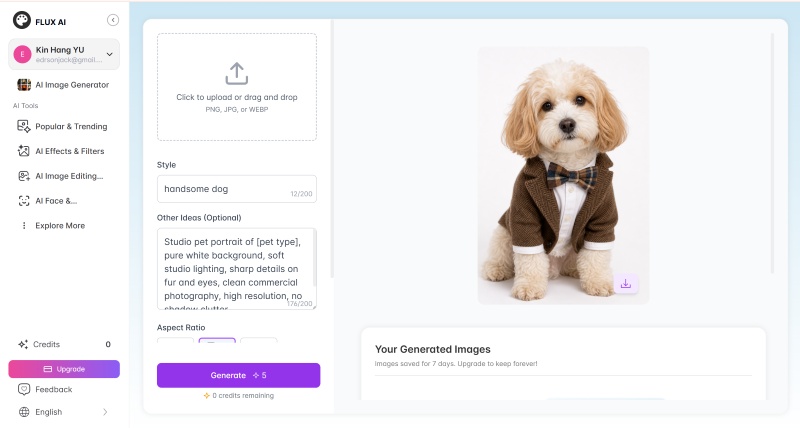
Flux AI is a tool for making custom pet portraits from real photos. Unlike most tools that use a text-to-image model, Flux AI uses a method based on reference images. Users upload real pictures of their pets, and the AI makes artistic changes while keeping the pet's unique face, coat color, and breed features.
Therefore, Flux AI is a good choice for users who want very accurate results and do not want the AI to change their pet's features randomly. If your main goal is to make a customized portrait that really looks like your pet, Flux AI seems not bad.
Key Strengths
- Custom Style Prompts: Including Baroque royal painting, Disney cartoon, watercolor with flowers, and comic book vibes for pets
- No Sign-up or Account Needed: upload a pet photo and generate a portrait directly in the browser.
- AI Pet Effects & Filters: You can apply as many filters and effects as possible
- Popular Portrait: You can learn about the current trends of AI portrait
- Fast Generation: Typically within seconds, followed by immediate download and sharing
Advantages
- No account, no credit, no software installation
- Free-form prompt control lets you request almost any style
- Quick turnaround for testing multiple style ideas
Weaknesses
- Free outputs are generally for personal use
- Fewer built-in editing or refinement tools than all-in-one platforms
Pricing Plan
- Totally free
Best for
- Beginners
- Children
- Kindergarten
A Comparative Analysis of 8 Best AI Pet Portrait Generators
| Tool | Key Strength Focus | Which Pets Most Suitable | Best Stage | Pricing Plan | Ideal for |
| CharaLab | 20+ pet styles,One-stop creation | Your own pet | Full creative pipeline | Free Trail | Pet content creators, |
| Adobe Firefly | Partial redraw | Any pet | Commercial-safe asset creation | Limited Free Credits | Graphic designers, |
| DreamPets | Pet-specific optimization | Any pet | Quick mobile generation | Free Trail | Mobile-first pet |
| Vofy | Print-ready asset | Stuffed Animal | Printable assets accumulation | Free Trail | Etsy sellers |
| Kling AI | Character consistency | Any Pet | Stylized campaign art | Limited Free Credits | Digital artists |
| Kaze AI | Old photo restoration and enhancement | Dogs and Cats | Memory preservation | Limited Free Credits | Pet memorial keepsake makers |
| PicLumen | Dedicated Pet Portrait template | Dogs and Cats | Viral memes and merchandise | Limited Free Credits | Pet business owners |
| Flux AI | Customized photos | Dogs and Cats | Fast experimentation | Totally Free | Beginners |
Which AI Pet Portrait Generator is Best for You?
1. Free or Paid
Budget is often the first thing people consider, but free can mean different things on these platforms. Some free plans let you publish images without watermarks, some only offer watermarked trials, and others limit how many portraits you can make each day.
Each of the eight software applications above lets you try them out for free, but the amount you can use and how quickly you use up credits is different for each one. It’s a good idea to check these details before you decide which tool to use.
If you want to sell prints or merchandise, think of every free plan as a trial, not a full production solution. Before you commit, check if the free plan allows commercial use, if exports are watermark-free, and how many images you can make each day when your campaign begins.
2. Your Pet Type
Most AI pet portrait generators work well for dogs and cats. The main differences appear when you use unusual species, want to include multiple pets, or have older or damaged photos.
- For Your Own Pet: CharaLab’s free credit gives you a 4K, watermark-free pet portrait.
- For Any Pets: The most specialized is DreamPets because it uses a model designed for pets. If you want to make a pet video, Kling AI might be helpful.
- For Stuffed Pet: If you want the pet's fur to be incredibly realistic, Vofy can be used right away
- For Dogs and Cats: There doesn't seem to be much difference between Kaze AI, PicLumen, and Flux AI.
3. Purpose of AI Pet Portraits
Not just the type of pet. When selecting an AI pet portrait, you should also consider the following purpose:
- For social posts, avatars, and memes?
- For printable wall art and gifts?
- For merchandise and print-on-demand?
- For memorial keepsakes?
- For commercial brand campaigns?
- For animated pet content?
Before you print, make sure the export resolution fits your product. Large canvas prints or posters need the highest resolution your tool can provide. For avatars and social posts, a clean, well-cropped file is enough.
4. Learning Curve
Learning curve does not mean one tool is always harder than another. It means each tool asks you to make different choices before you start.
With modern AI pet portrait generator, the encouraging part is that almost none of this requires a technical background. There is no drawing skill, no layer masks, and no manual retouching involved. What you are really learning is a short list of choices, pet style, ratio, prompt, and photo quality .
Here is a simple rule: choose the AI pet portrait generator whose default output matches what you want in the end, whether that is a file, a print, or a framed product. This way, you will spend much less time fixing results later.
FAQ
Is there any AI pet portrait generator for cartoon Styles?
Yes, CharaLab lets you create cartoon, anime, 3D, and Pokémon-style portraits. You can also try Adobe Firefly, Vofy’s Cartoon Pet Avatar preset, Flux AI, or Kaze AI for great cartoon pet portraits.
Which AI pet portraits generator is best for commercial use?
CharaLab is a good option since it lets you export without watermarks and offers editing and video tools together. Adobe Firefly is also a solid pick for commercial work because it uses licensed and public-domain content. One thing you should know: before selling printed products, make sure to review each platform’s latest license terms.
Which AI pet portraits generator is best for animated pet videos?
CharaLab stands out as a top choice for making animated pet videos because it lets you create videos from images and add effects all in one place. While Kling AI can also make videos, CharaLab makes it easier to turn a single pet photo into a moving animation.
Can I use CharaLab for a passed-away pet?
Yes, you can upload a favorite photo of your pet and use CharaLab’s image-to-image feature to apply a gentle style like Ghibli. You can also remove the background, fix an old or damaged photo, and save a high-resolution file for a memorial print or tribute.
What pet portrait AI styles can I generate?
Some popular styles are royal and Renaissance oil paintings, watercolor, cartoon, anime, 3D render, fantasy, pop art, sketch, Ghibli, Pokémon-inspired, and soft memorial illustrations. The names might change depending on the platform, but most tools offer oil painting, royal, cartoon, and watercolor styles.
Conclusion
The best AI pet portrait generator for you depends on what kind of pet you have, your budget, why you want the portrait, and how easy the tool is to use.
CharaLab leads the list because it combines 20+ styles, built-in editing, and animal-friendly images in one watermark-free platform. Adobe Firefly is the best free option for creators who need commercially safe assets. DreamPets is ideal for mobile-first dog and cat content. Vofy shines when the goal is printable pet art. Kling AI delivers the strongest royal and painterly looks, while Kaze AI is a privacy-focused pick for memory preservation. PicLumen offers your pet with pet portrait template, and Flux AI is the fastest no-sign-up way to experiment with Renaissance-style pet portraits.
 10 Best 3D Character Creator Tools in 2026(Reviewed & Ranked) >>Which is the best 3D character creator in 2026? Simply follow the comparison of 10 tools based on features and pros/cons, to find the right tool for your work. >>
 8 Best OC Generator for Consistent AI Characters (2026) >>Are you searching for the best OC generator? This guide compares the 8 best OC generators, which will help you choose the right one for your consistent OCs. >>
 6 Best DnD Character Creators from a Beginner's Perspective >>Looking for the best dnd character creator in 2026? This guide lists the 6 best creators for new users in DnD. >>
He is an experienced expert in AI character creation and has led the early design of many virtual character products. His step-by-step guides help creators build the AI character online from scratch. Here, he turns complex character prompts into different character styles, helping every human-machine collaboration get closer to the perfect character you imagine.